SK.
Sagar Kumar
Portfolio · © 2026
All Work
B2C · Mobile App · PayU Payments · 2023

PayU Super App
Redesign

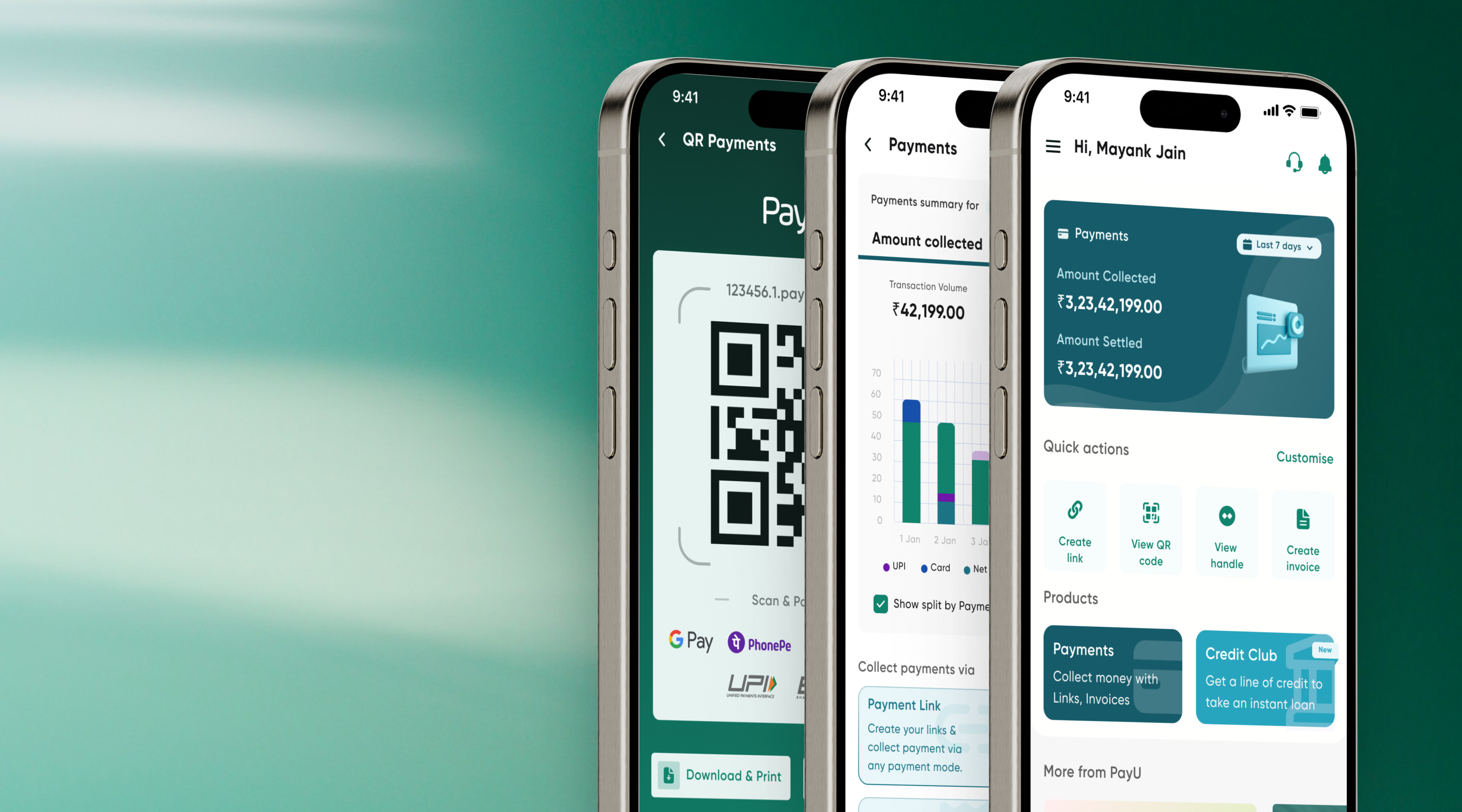
End-to-end redesign of PayU's merchant mobile app — from deep discovery through a full Double Diamond process to high-fidelity delivery. Tackled 30.87% negative-sentiment UX issues, a 32% product-engagement churn, and zero cross-sell discoverability. Rolled out to 125k+ merchants.

My Role
Lead Product Designer
Client
PayU Payments
Platform
Mobile · Android & iOS
Outcome
75% MAU ↑ · 65% Engagement ↑
Year
2023 · 8 Months
Final Designs
PayU Super App Redesign
Product Briefing

An all-in-one merchant super app

The PayU Super App project aims to create a comprehensive, user-friendly, and merchant-centric super app to address existing problems in the PayU application. The app offers an all-in-one solution for payments, financial services, and business management — allowing merchants to efficiently manage their operations and finances.

The Core Problem

We noticed an upward trend in negative sentiments around the app. Upon further analysis, we found that bad UX was contributing 30.87% to the overall negative sentiment. Looking deeper at support escalations revealed new problem sets:

  • Lack of awareness of different PayU products
  • Some merchants unaware a native PayU app exists
  • Existing app engagement issues rising continuously
  • Store ratings showing a sustained negative trend
01 · Diverge
Discover
Problem space
Secondary research
Funnel analysis
User interviews
Competitive bench.
02 · Converge
Define
Problem clarity
User personas
Journey mapping
Insights synthesis
Problem statement
03 · Diverge
Design
Solution space
MoSCoW analysis
Information arch.
Lo-fi wireframes
Design system
04 · Converge
Deliver
Solution clarity
Hi-fi prototypes
Usability testing
30% rollout
100% deployment
01
Phase One · Research Phase
Discover
Problem Identification

32% of merchants churned before ever engaging with a product

Secondary research with the business revealed a critical funnel collapse. Of 12,556 app users, only 32% engaged with any PayU product — meaning 68% of onboarded merchants were either unaware of or unable to access the product suite.

Product Engagement Funnel — Past 365 Days
App Users (baseline)
100%
Visited Reports or Products
66%
Visited One or More Product
50%
Engaged with one or more Product
32%
Problem: 32% churn on accessing the product section — Discovery is the core issue. Opportunity loss due to missing quick actions.
Product Usage Share — What Merchants Actually Use
74%
Payment Link
Primary collection method for most merchants
18%
Invoice
Used for B2B and service-based billing
8%
Payment Handle
UPI handle-based collections — least adopted
Insight: Payment Link dominates at 74% but lacks mobile-native features. Invoice at 18% has no mobile equivalent at all. Both are critical redesign priorities.
December 2022 — The Decline That Triggered the Redesign
Year-over-Year Decline
20%↓
Monthly Active User decrease (Dec '22)
12%↓
Product Engagement decrease year-on-year
Absolute Baseline Numbers
Total App Users 1.25 Lac
Visited Reports or Products 83K
Tried One or More Product 63K
Monthly Active (engaged) 40K
Merchant Classification

Understanding who our merchants really are

Before redesigning, it was critical to understand the merchant base composition. PayU's 20,944 active merchants span diverse sectors and usage patterns — grouped into three distinct cohorts based on how they interact with the platform.

20,944
Total Active Merchants
at time of research
11,068
Tools Users
Actively use PayU payment tools — Payment Link, Invoice, or Handle
5,103
Website Users
Primarily use PayU's web dashboard — not on mobile app
4,772
Other / Mixed
Low engagement, using app for basic transaction views only
Merchant Sectors
✈️ Airlines 🛒 E-Commerce 🏥 Healthcare 🎓 Education 🏦 Financial Services 🚌 Transport 🏪 Retail / SMB 💼 Professional Services
Design implication: Merchants across these sectors share a common need — fast payment collection on mobile — but differ in reporting depth, inventory complexity, and settlement urgency. The redesign had to serve all cohorts from a single unified app.
Identifying Root Causes

Web App vs Mobile App — Critical feature gaps

A feature parity audit between the web dashboard and mobile app revealed that many critical merchant tools were available on web but entirely absent from mobile — forcing merchants back to desktop or competitor apps.

Feature / Capability Web App Mobile App
Overview Dashboard
Payment Links
Payment Invoices
Invoice Inventory Management
QR Code Payments
Payment Handle
Reporting
Transaction Detail View
Share Transaction Detail
Cross-Selling / Up-Selling
Payment Landing
Primary Research

User interviews surface what data can't tell

After establishing purpose through secondary research, I conducted primary user interviews with existing PayU merchants across categories — investment advisors, SMB merchants, and transport businesses — to extract needs, pain points, and behavioral patterns.

User Interviews
Moderated 1:1 sessions with 3 merchant segments — investment advisor, SMB, transport agency
3 participants · 45 min each
Funnel Analysis
Product engagement funnel review across 12,556 app users over the past 365 days
12,556 users · 365 days
App Store Analysis
Sentiment analysis of app store reviews to quantify UX-related negative feedback
30.87% UX-related negative sentiment
Competitive Benchmarking
Desk research against PhonePe, Razorpay, Stripe, and Google Pay for feature benchmarking
5 competitors analysed
UX
No proper user experience in the existing app
Merchants were unable to use the application effectively. Critical flows like report generation and invoice creation had too many friction points, leading to task abandonment.
Gaps
Significant gaps in product offering vs. user needs
Merchants were switching to competitor apps like Razorpay and Stripe for features PayU's web dashboard offered but mobile didn't — including report downloads, inventory management, and QR payments.
Settlement
Priority settlement not discoverable on mobile
While priority settlement was active in the dashboard, users couldn't access or understand it through the app — a key financial benefit going entirely untouched by merchants who needed it most.
Lending
Payment lending can be introduced on mobile
Merchants on the PayU app were highly interested in financial services like business lending — but no native lending onboarding existed in the app. This represented a major cross-sell opportunity.
Reporting
Improve reporting feature and share transaction details
Merchants needed a way to generate, filter, and share transaction reports directly from mobile — especially useful for accountants and partners. The current app had no export or share functionality for transaction data, forcing merchants back to the web dashboard.
Security
Security improvements — Two Factor Authentication needed
Multiple merchants flagged security as a concern. Without Two Factor Authentication (2FA), merchants felt their payment accounts were vulnerable — particularly those operating at high transaction volumes. Introducing 2FA was highlighted as a trust-building feature that would directly impact app adoption.
Competitive Analysis

How competitors are winning merchant trust

Desk research against PhonePe, Razorpay, Stripe, and Google Pay revealed clear patterns in what best-in-class merchant apps do that PayU didn't — setting a clear benchmark for the redesign.

Feature PayU (Redesign) PhonePe Razorpay Stripe GPay
Dashboard Overview
Payment Links
QR Code Payments
Invoicing + Inventory
Transaction Reports Partial
Native Customer Support Chat only Email only Help centre
Cross-Sell / Up-Sell Partial
Priority Settlement Partial
Mobile-First Design Partial
Biometric Authentication
In-App Notifications Email only Partial
Training Videos / Onboarding Partial
Cashback / Offers for Merchant Partial
Vernacular / Regional Dashboard Partial
User Sentiment Analysis

App Store reviews reveal three dominant pain themes

Analysing App Store and Play Store reviews from PayU merchants surfaced a consistent pattern of complaints. 30.87% of all reviews contained UX-related negative sentiment, clustering into three major themes that directly informed redesign priorities.

Customer Support
Most cited pain

Merchants consistently complained about delayed and inaccessible support. No in-app chat, no escalation path, and no resolution tracking made disputes frustrating to resolve.

Sample feedback
"No one responds to my support tickets. I've been waiting weeks for a refund resolution."
Accessibility
UX friction + language gaps

The app was difficult to use for merchants unfamiliar with English interfaces. Tier 2/3 city merchants and non-tech-savvy users struggled with navigation, layout complexity, and the absence of vernacular language support.

Sample feedback
"The app is too complicated. I need Hindi language. Very confusing for small shop owners."
Cross-Selling / Up-Selling
Missed revenue opportunity

Merchants were unaware of additional PayU products — priority settlement, business lending, QR codes — because no in-app discovery existed. Cross-sell recommendations were entirely absent from the merchant experience.

Sample feedback
"I didn't know PayU had a QR code feature. I've been using a different app for that."
App Store & Play Store Feedback
Both platforms showed consistent ratings depression tied to UX issues — not service reliability. Merchants who had positive payment experiences still left 2–3 star reviews due to app-specific frustrations. This confirmed that design, not infrastructure, was the primary problem to solve.
02
Phase Two · Synthesis Phase
Define
User Personas

Three merchants, three distinct needs

Based on interview responses, I designed three user personas representing the primary segments of PayU's merchant base. These personas guided every design decision throughout the project.

Ashutosh Mishra, 35
Investment Advisor · Jaipur
Context
Owns a small investment consulting company. Uses PayU for 1.5 years to collect fees and payments.
Needs
Mobile-friendly interface, enhanced payment link features, better support on demand
Pain Points
Uses 3rd-party invoicing apps. No proper user experience in PayU app. Support is hard to reach.
Invoicing Mobile-first Support
Sajid Khan, 31
SMB Merchant · Pune
Context
Runs Apple Authorised Service Centre. High transaction volume, relies heavily on payment links and invoices.
Needs
QR Code app, enhanced payment links, report generation, scheduled notifications for payment reminders
Pain Points
No QR payment collection, no native reporting, no scheduled payment follow-ups in-app
QR Payments Reporting Automation
Tamanna Singh, 45
SMB Merchant · Transport Agency
Context
Manages a transport and logistics agency. Uses PayU for 2+ years but only through the web app — no mobile usage.
Needs
Need mobile application parity with web, better UX, access to financial services (lending) on app
Pain Points
Not aware of PayU's mobile application. Existing PayU app not mobile-friendly. Financial services not available.
Mobile Parity Financial Services
User Journey Mapping

Emotional states across the current app experience

Mapping the journey of an Apple Authorised Service Centre owner through the PayU app revealed exactly where frustration and confusion peaked — and where opportunity lay to convert cautious users into satisfied ones.

01
Login & Onboarding
Opens app, enters credentials
02
Home Screen
Views dashboard, scans for products
03
Reports
Tries to generate transaction report
04
Payment Link
Creates and shares payment link
05
Invoice
Attempts to add item inventory
06
Support
Raises complaint about missing feature
Positive
Neutral
Frustrated
Satisfied
Confused
Disappointed
Positive experience
Neutral / uncertain
Frustration / drop-off risk
Extracting User Needs · Analysing Sentiments

From user statements to design opportunities

Interview data was synthesised into user statements, insights, and concrete design opportunities — forming the bridge between research and solution design.

User Statements
"I can't generate reports from my phone. I always have to use a laptop."
"There's no QR option — I lose sales at the counter every week."
"I don't even know what products PayU has. The app just shows transactions."
"Support takes days to respond. I need it right in the app."
Insights
Mobile app lacks feature parity with web — critical flows unavailable
Zero QR or mPOS capability creates merchant revenue leakage
No cross-sell discovery surface — full product suite invisible
Support access relies on external channels, breaking mobile flow
Design Opportunities
Build full-featured reporting module with export on mobile
Introduce QR Code Payments as a first-class feature in Phase 1
Redesign home as product discovery hub with cross-sell shelf
Embed native customer support ticket + chat in-app
Defining the Problem Statement

From symptoms to root cause

"PayU app is a single-channel mobile app that helps users track their business more efficiently. The app's existing design and structure lack user-friendly features, resulting in a subpar user journey and reduced engagement with PayU's offerings. To address these issues, a comprehensive redesign and restructuring initiative is essential to create a seamless, intuitive, and efficient user experience."
Redefined problem statement — post research synthesis
Uniformity Across Platforms
Mobile app parity with web dashboard so users are not forced back to desktop
Cross-Selling & Up-Selling
Expose merchants to the full PayU product suite through smart in-app discovery
Best-in-Class Help & Support
Native in-app customer support reducing reliance on KAM and email escalations
Better User Experience
Intuitive, fast, confident experience that builds merchant trust and retention
03
Phase Three · Ideation Phase
Design
Ideation & Prioritisation

MoSCoW: What to build, what to park

Using MoSCoW analysis for idea prioritisation, I clustered features into four groups to align the team on a realistic Phase 1 scope without sacrificing the most critical merchant needs.

Must Have
Intuitive and user-friendly interface for quick navigation
Report generation inside application
Cross-Selling and Up-Selling
Real-time transaction tracking and reporting
QR Code Payments
Enhanced Payment invoicing and Links
Refund and dispute resolution features
Mobile point-of-sale (mPOS) functionality
Should Have
Support for various payment methods
Integration with popular e-commerce platforms
Natural and dispute resolution features
Could Have
Advanced analytics for sales trends and customer behaviour
Customisable dashboard and reporting tools
Loyalty program management for customer retention
Inventory management to sync online and offline sales
Won't Have (Phase 1)
Complex financial tools like budgeting
Advanced AI features for predictive analytics
Social media integrations
Native Lending Onboarding
Native Customer Support
Native Signup flow
Design Vision · Information Architecture

From desktop dashboard to seamless mobile

"To revolutionise the PayU Payments application, our design vision is to seamlessly transition powerful desktop dashboard features to a mobile environment. By prioritising user experience enhancements, we aim to not only retain but elevate user satisfaction, reducing churn rates and establishing PayU as the go-to platform for secure and intuitive mobile payment management."
Design Vision Statement
PayU Merchant App
Home
Balance Overview
Quick Actions
Product Suite
Transaction Feed
Cross-Sell Shelf
Payments
Payment Links
QR Code
Invoice + Inventory
Payment Handle
mPOS
Reports
Transaction Reports
Settlement Reports
Export / Download
Transaction Detail
Share Detail
Products
Priority Settlement
Payment Landing
Business Lending
uP Card
Offers & Discounts
Support
Raise Complaint
Live Chat
FAQs
Profile Settings
KYC / Documents
04
Phase Four · Implementation Phase
Deliver
High Fidelity Wireframes

The redesigned PayU merchant experience

Every screen was designed with the three personas in mind — ensuring first-time users could onboard with confidence, power users could transact in seconds, and all merchants could discover and use the full PayU product suite.

Login · Onboarding Experience
PayU Super App — Login Screen
Login Screen
PayU Super App — Onboarding Flow
Onboarding Flow
The All-New Homescreen

Welcome to the redesigned PayU Mobile App, where simplicity meets power. The new Home Screen provides a seamless and intuitive experience — empowering merchants to manage payments effortlessly with the full product suite one tap away.

PayU Super App — All-New Homescreen
All-New Homescreen
Payments · Invoice · QR Code

Experience the future of seamless transactions with QR Code Payments — the fastest, safest way to pay and receive. Payment invoicing was redesigned with item-level inventory management, directly addressing Sajid's top pain point.

PayU Super App — QR Code Payments
QR Code Payments
PayU Super App — Payment Links
Payment Links
PayU Super App — Invoice
Invoice · Inventory
Settings · Support
PayU Super App — Settings & Support
Settings · Native Support
05
Validation
User Testing
Testing Methodology

Rolling out to real merchants at scale

The application was tested using an unmoderated usability study by rolling out to 30% of existing PayU merchants in Apr–May 2023 (~38k users). Participants were categorised by platform usage — app-only, dashboard-only, and both. KPIs tracked TAT comparison, user error rates, conversion rates, and app engagement.

KPIs Tracked
Task completion rate — could users finish key flows?
TAT comparison — new app vs web dashboard
Monthly active users (MAU) — 30 day retention
Product engagement rate across all sections
User error rate and abandonment in critical flows
Participant Breakdown — 38k Users
App-only users
Mobile merchants~18,000
Dashboard-only users
Desktop merchants~12,000
Both platforms
Power users~8,000
Method: Unmoderated usability study · Apr–May 2023 · 30% rollout cohort
Results — 30% Rollout · ~38k Users

Phase 1: Proof it works

The first rollout to 30% of merchants in April–June 2023 validated the redesign direction decisively across every key metric.

75%↑
Increase in MAU Apr–June 2023
60%↑
Increase in Product Engagement
30K
Users came to App Homepage
32K
Users tried using products in app
28K
Using products on monthly basis
Results — 100% Rollout · ~125k Users

Phase 2: Full scale confirmation

After the 30% success, the app was rolled out to 100% of merchants in August 2023 — replicating and extending the gains at more than 3× the user base.

70%↑
Increase in MAU from August 2023 after full rollout
65%↑
Increase in Product Engagement across all merchant types
81K
Active merchants using products monthly — 3.2× baseline
The App is Live

Available now on App Store and Play Store

The redesigned PayU Super App is live for all merchants. After a successful 30% rollout and full deployment in August 2023, the app is now available to download and use. I'd love to hear what you think of the experience — download it and let me know.

App Store
Play Store
PayU Super App
Now in Production
iOS & Android
100% merchant rollout
81K+ monthly actives
Key Learnings

What this project taught me

Data without context misleads. The funnel showed 32% engagement — but without interviews we'd have built the wrong solution. Research sequencing matters enormously.

Feature parity is not the goal. Web-to-mobile parity was a starting point, not a solution. The real goal was to redesign for mobile-native mental models.

Phased rollout is underrated. The 30% rollout gave us real signal before committing to 100% — and the metrics were strong enough to justify full deployment without further iteration.

What I'd Do Differently

Next time around

I would invest more time upfront in longitudinal diary studies to understand how merchants' workflows evolve over time — not just single-session pain points.

The competitive analysis leaned heavily on global fintech benchmarks. Indian SMB merchant usage patterns — especially in Tier 2 and 3 cities — have significant nuance that desk research alone can't capture.

I'd also push harder for native lending onboarding in Phase 1 — the interview data clearly showed demand, but it was deprioritised due to engineering constraints.

Explore More Work
See all projects →
Back to All Work