SK.
Sagar Kumar
Portfolio · © 2026
All Work
B2B · FinTech · PayU · 2022–2023

PayU Partners Platform

Redesigning a 14-step manual onboarding into a self-serve digital portal — eliminating 40% drop-off.

My Role
Lead UX/UI Designer
Client
PayU Payments
Platform
Web · Desktop + Mobile
Team
2 Designers · Engineering
Duration
4 Months · 2020–2021
Final Designs
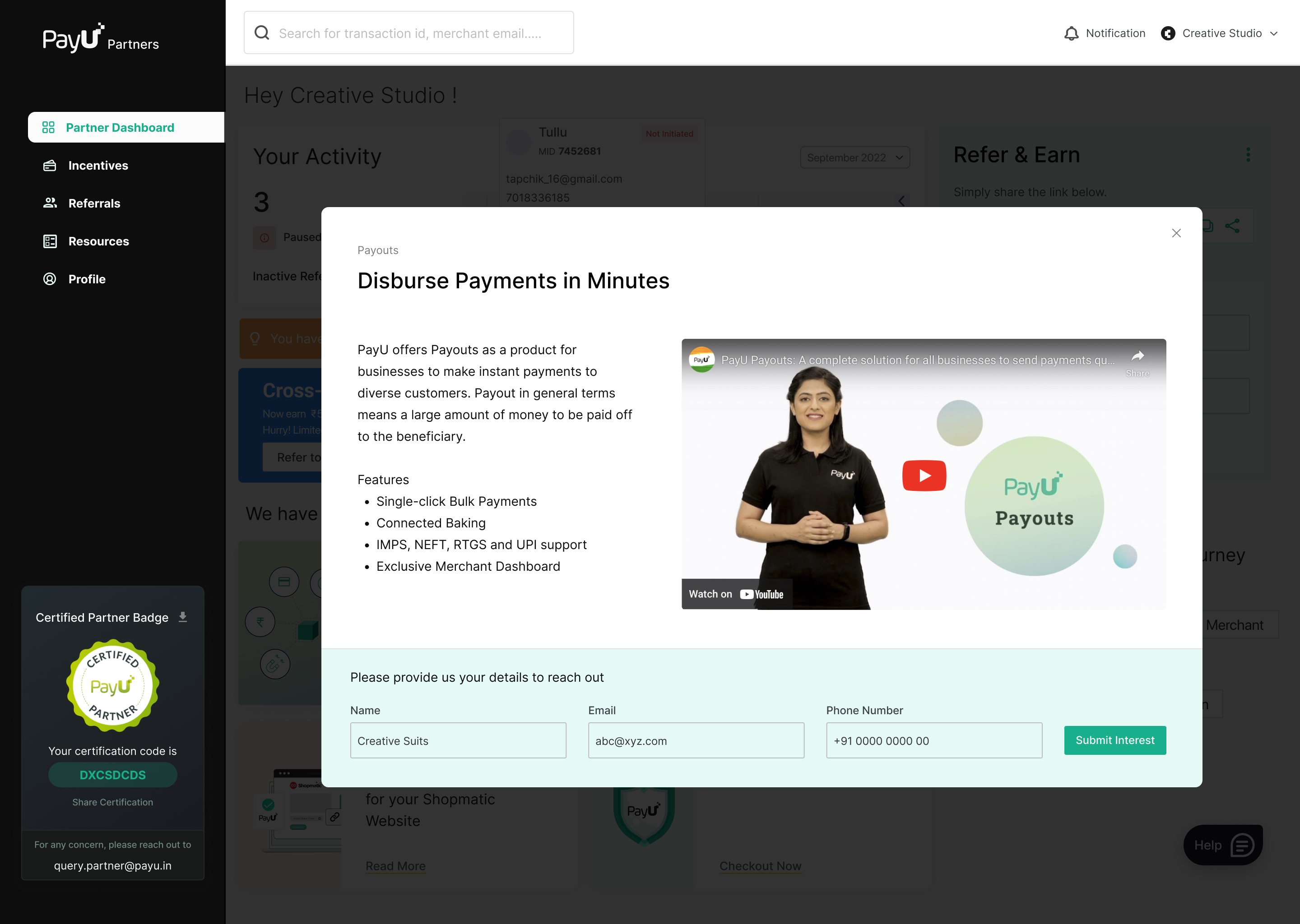
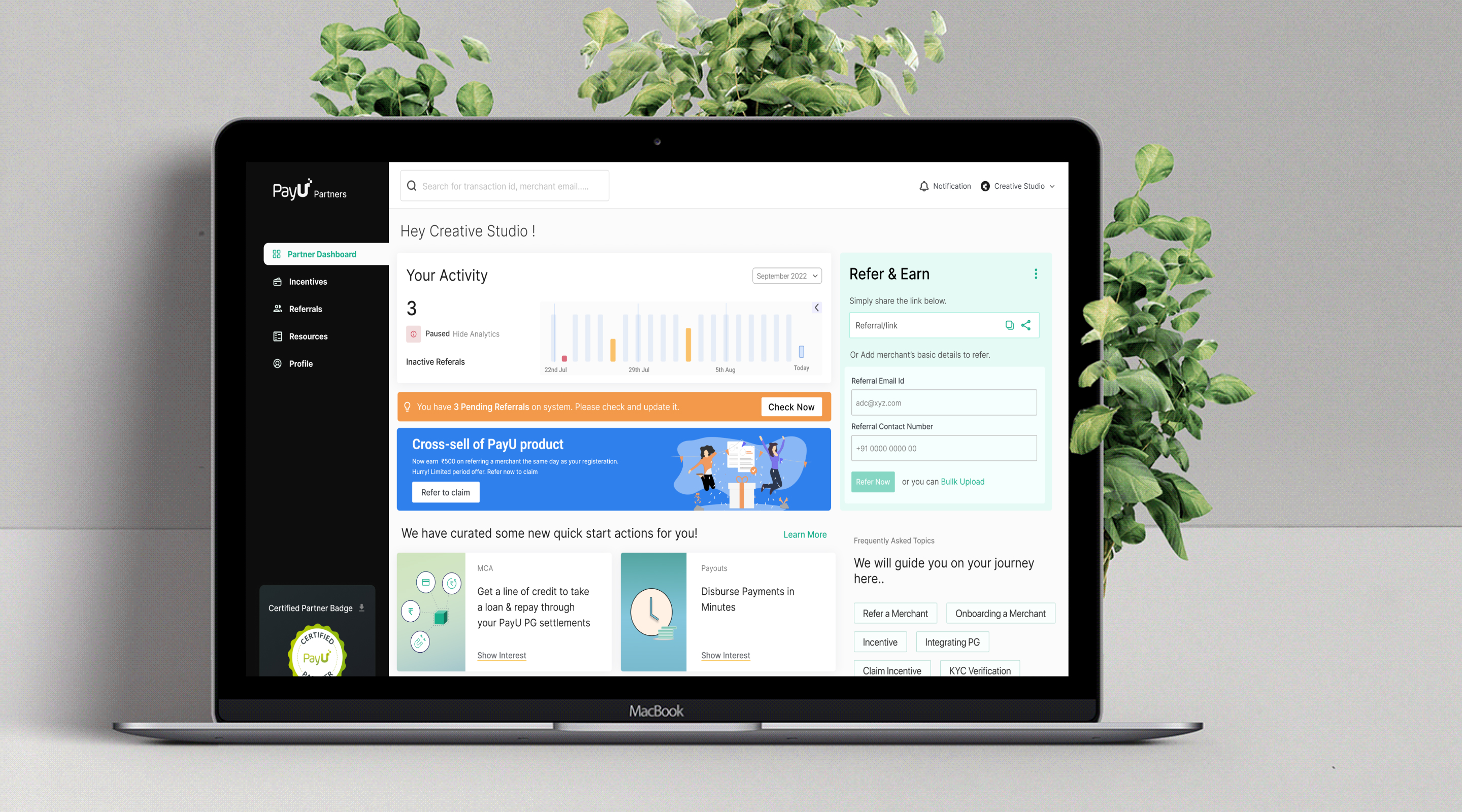
PayU Partners Platform — Dashboard Overview

Context & Challenge

PayU's Partner Program enables developers, resellers, and enterprise platforms to refer merchants and earn incentives on transactions. The legacy dashboard was built exclusively for individual resellers — it lacked self-serve capabilities for enterprise partners, relied heavily on KAM support for every step, and had a 60+ pain-point journey causing massive drop-offs.

We set out to redesign the entire partner experience across three user types: Enterprise Platforms, Resellers, and Developers.

Platform Scale

300+
Active Partners
350K+
Referred Merchants
40bn
Transaction Volume
15+
Local Offices

60+ pain points across 7 journey stages causing 40% drop-off

Account for Platform Partners

Enable enterprise platforms to self-onboard and set up payment gateway on their platform without KAM intervention.

Reevaluate Feature Usability

Filter junk leads and make pricing, merchant status, settlement & incentive information transparent and actionable.

Enable Self-Serve

Reduce KAM dependency for onboarding funnel and retention. Partners should manage everything independently.

Process
Double Diamond
Discover → Define → Develop → Deliver
Discover
Research & Audit
  • User interviews (14)
  • Journey mapping
  • Stakeholder interviews
  • Existing platform audit
Define
Insights & HMW
  • Personas & archetypes
  • Gap analysis
  • Problem statements
  • Design objectives
Develop
Concepts & Flows
  • User flows & wireframes
  • Information architecture
  • Interaction patterns
  • Visual design system
Deliver
Design & Handoff
  • Hi-fidelity designs
  • Prototype & validation
  • Component library
  • Dev handoff & QA
01
Discovery
Research & Insights
14 participant interviews, heuristic audit, and competitive benchmarking across partner platforms

User Research · 14 Participants

Methodology

We conducted 14 in-depth user interviews via video calls across 5 distinct groups:

  • 4 Internal Stakeholders (Sales, Partnerships)
  • 3 Active Resellers (experienced users)
  • 2 New Resellers (onboarding journey)
  • 2 Stuck Resellers (abandoned midway)
  • 3 Platform Partners (API integrators)

Key Themes

  • Awareness → Partners didn't understand program value or what they were signing up for
  • Conversion → Sign-up and document verification took 2–3 weeks with unclear next steps
  • Usage → No dashboard support for developer integration or platform partner workflows
  • Retention → Manual incentive claiming, poor visibility into settlements, KAM dependency

3 Core User Types

Aman
Developer

Runs a website & app solutions business. Refers clients needing PayU integration, helps with PG technical setup. Wants to quickly integrate on behalf of clients.

Pain Point

No dashboard support for PG integration. Relies on direct KAM for integration credentials.

Integration Technical Bulk Referrals
Mohan
Reseller

Experienced reseller. Uses dashboard regularly to refer merchants, track incentives, and research PayU products. Wants visibility into multiple products beyond Payment Gateway.

Pain Point

Dashboard only shows PG. Can't discover or refer Invoicing, Subscriptions, Payouts solutions.

Multi-Product Learning Incentives
Shopmatic
Platform Partner

E-commerce platform integrating PayU PG. Merchants can find PayU natively on the platform. Representative checks dashboard for incentive tracking and quarterly claims.

Pain Point

No API to programmatically fetch settlement & incentive data. Manual quarterly process with KAM.

API-Driven Bulk Automation
02
As-Is
User Flow — Old
Mapping the existing partner journey to surface friction, drop-off points, and KAM dependencies across all 7 stages

7 Stages · 60+ Pain Points

Stage 1
Discover Program

Landing page unclear. Junk leads from merchants who should sign up as customers, not partners. Smaller resellers not represented.

Stage 2
Sign Up

Confusion between merchant & partner login. No way to resend OTP. Physical signature required for agreement document.

Stage 3
KYC & Verification

Unclear what docs are needed. Can't upload in chunks. Verification takes 2+ weeks instead of promised 2 days.

Stage 4
Merchant Onboarding

No dashboard PG integration support. Partners blind to merchant progress. KAM-dependent for everything. High business cost.

Stage 5
Settlement & Incentive

Settlements not real-time. No breakdown by merchant. Incentives appear at different time. Can't filter by month/period.

Stage 6
Refer Merchant

Multiple confusing methods (single, bulk, link). No support for non-PG products. Partner profile status never checked.

Stage 7
Claim Incentive

Manual process with no auto-credit (unlike competitors). Requires invoice + VRF form. Quarterly cycle. Disputes take 3+ months.

Stage 4
Settings & Users

No way to add team members with permission levels. Can't manage multi-user access for enterprise partners.

Stage 5
Engagement & Learning

No community, no partner forum, no shared learning. Partners feel isolated. No way to discover new opportunities.

Gap Analysis

1
Partners Don't Get Leads

Dashboard doesn't help partners discover new leads. Only PayU benefits. Partners want to find merchants in their geography or vertical for cross-selling.

2
No Community

No way to engage with other partners. No forum, events, or shared knowledge. Partners feel isolated and lack peer learning opportunities.

3
Dashboard Scope Limited

Partners only know about Payment Gateway. Dashboard doesn't support referring Subscriptions, Invoices, Payouts. Can't map merchants to products.

What We Cannot Change

1
Payout Automation

Incentive payouts cannot be automated — finance & GST compliance require manual processing. Claiming process remains offline.

2
Custom Pricing

Cannot offer custom incentive plans on the dashboard. Finance team manually handles custom arrangements.

3
Custom Calculation

Incentives on custom plans cannot be auto-calculated. Finance does manual computation for non-standard deals.

4
Manual Claiming

Quarterly incentive claiming must remain a manual workflow. We can make it visible and trackable, but not automatic.

What Success Looks Like

Self-Serve Onboarding

Partners complete entire onboarding without KAM involvement. Clear progress tracking. Predictable completion timelines.

Real-Time Visibility

Settlements & incentives visible in real-time. Breakdown by merchant. Filter by period. No surprises.

Developer Support

Integrated credentials management for developers. Request access, share with merchants. No external emails.

03
Structure
Information Architecture
Restructuring the partner portal navigation to reduce cognitive load and surface the right content at the right stage of the partner journey

Partner Portal Structure

The IA was rebuilt around three partner archetypes — Developer, Reseller, and Platform — ensuring navigation reflects the distinct workflows of each user type rather than a one-size-fits-all menu.

PayU Partners Portal
Dashboard
KPI Overview
Activity Graph
Nudge Cards
Referrals
Merchant List
Add Merchant
Bulk Upload
Merchant Profile
Incentives
Earnings Overview
Claim Incentive
Invoice Upload
Resources
Product Catalogue
Integration Docs
Marketing Kit
Settings
Profile
Users & Permissions
API Credentials
Help & Support
Consolidation

Reduced from 11 scattered nav items to 5 primary sections — eliminating duplicate entry points that caused partner confusion.

Task-First Grouping

Navigation follows partner tasks (refer, earn, integrate) rather than internal product structure — matching mental models from user research.

Progressive Disclosure

Advanced options (API credentials, bulk upload) are nested under primary nodes — keeping the core flow simple for new partners.

04
To-Be
User Flow — New
Redesigned end-to-end flows for 3 partner archetypes — eliminating KAM dependencies and enabling full self-serve across every stage

3 Core Use Cases

Aman (Developer)

Search "PayU Partner" → land on program page
Sign up with email, mobile, brand → verify OTP
Complete KYC (told verification = 3 days)
Receive agreement via email, sign digitally
Refer merchants with details & product
Request integration credentials for merchant
Merchant grants access on dashboard
Partner sees test & live salt/key instantly
Check incentives, claim quarterly

Mohan (Reseller)

Login → browse dashboard
Go to Resources to research products
Find Invoicing solution for client
Share resource link with notes
Add merchant via referral form
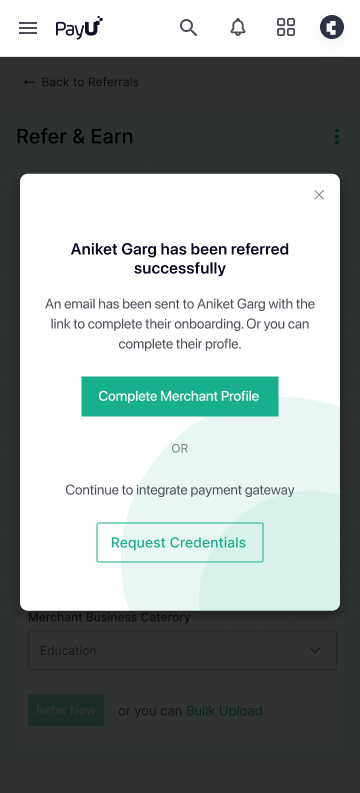
Merchant receives email to complete profile
Check incentive dashboard monthly
Download invoice template, upload, claim

Shopmatic (Platform)

Merchants find PayU natively on platform
Rep logs in to dashboard (SSO)
View real-time settlement data
Download merchant breakdown report
Check quarterly incentive status
Upload invoice & claim via dashboard
Track claim status without KAM
05
Key Screens
Final Designs
Core screens across the partner platform — dashboard, referrals, user management, support, and merchant profiles
01
Dashboard Home

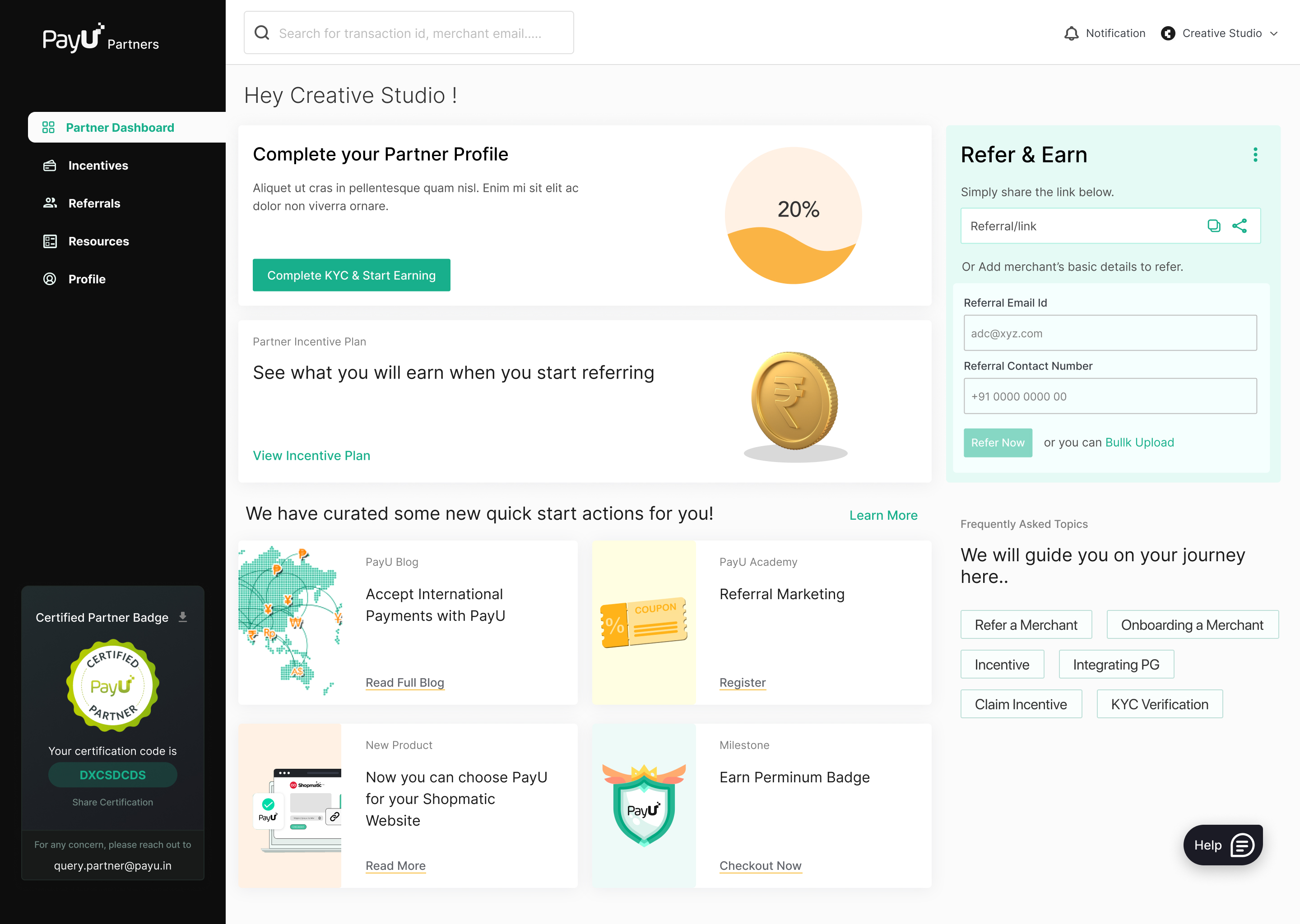
Partners Dashboard Overview

A single at-a-glance view of active referrals, new merchants this month, total incentives earned, and transaction volume. Nudge cards surface incomplete tasks so nothing falls through the cracks. The transaction graph shows performance trend over time — motivating continued referrals.
payu-partners.com/dashboard
PAY Drop payu-screen-01.jpg here
PayU Partners — Dashboard Overview
At-a-glance KPIs
Four metric cards (active referrals, this month, total incentives, transactions) give partners instant performance context.
Smart nudges
Inline callout highlights incomplete onboarding tasks — reduces drop-offs by surfacing what's next.
Performance graph
Transaction volume trend shows partner their business impact and motivates continued referral activity.
02
Referrals

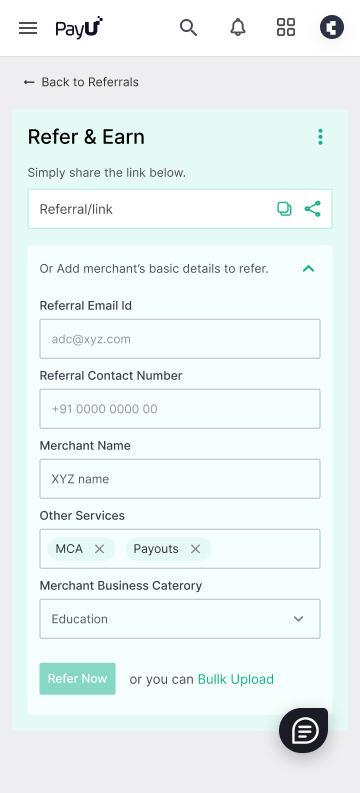
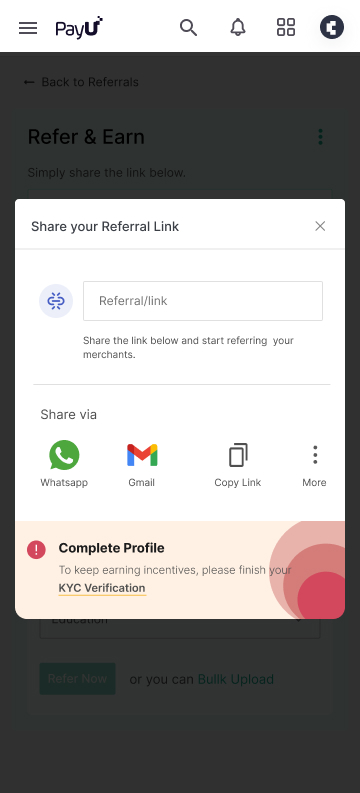
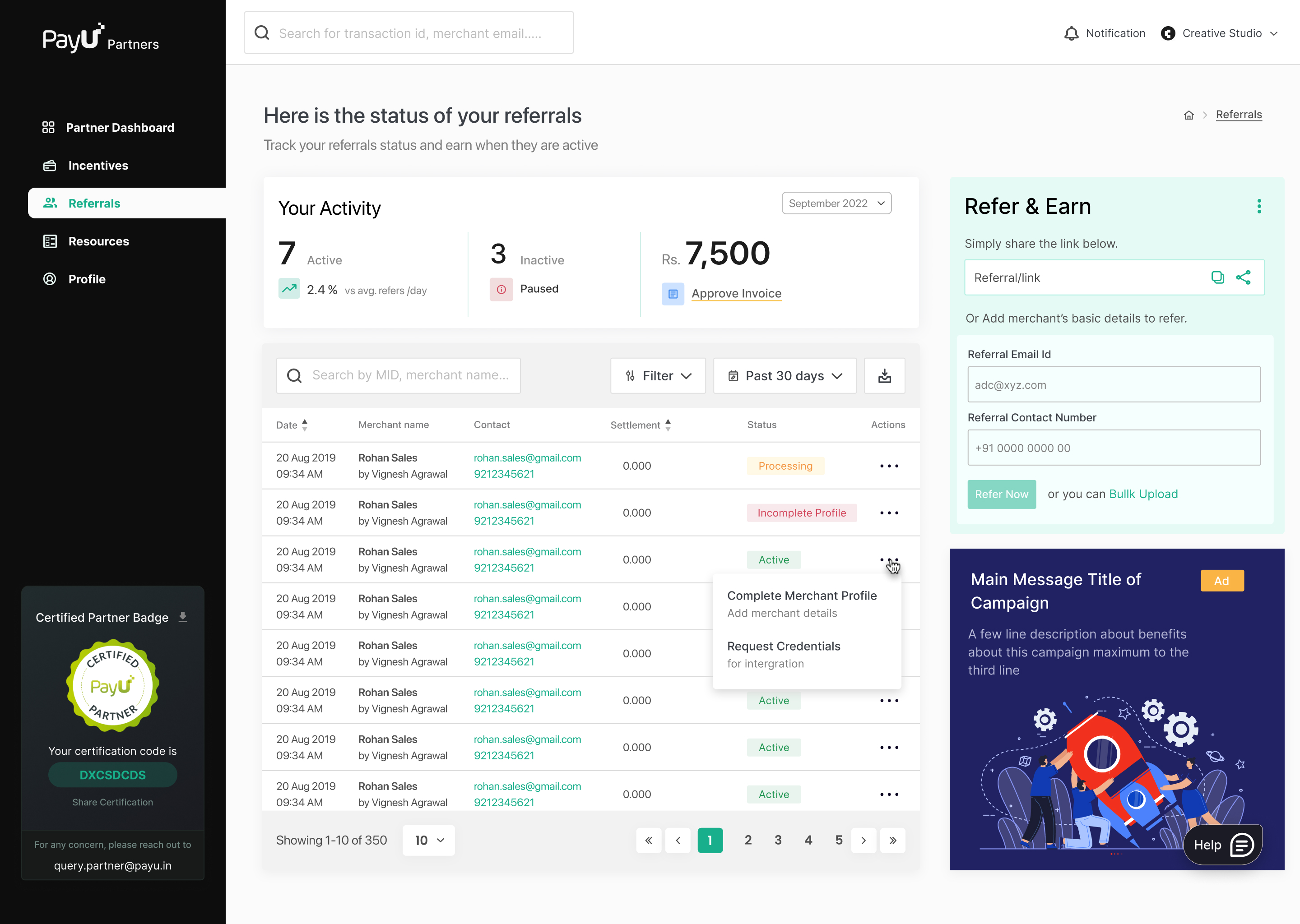
Merchant Referrals Screen

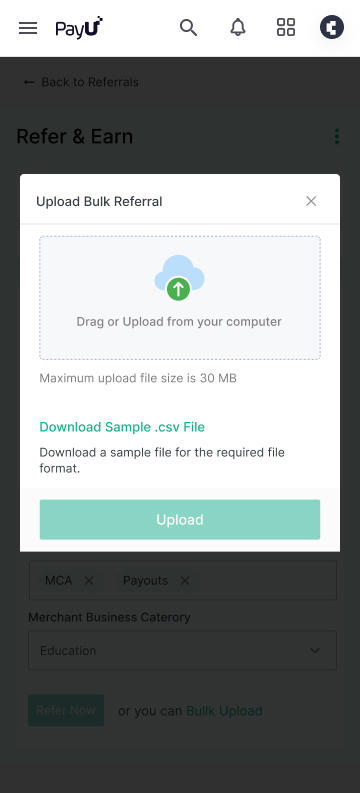
Partners can refer merchants individually via a clean modal form — collecting name, email, phone, business category, and product. Pricing is shown inline on the right so partners understand what they're selling. A bulk upload option handles high-volume referrals without repetitive form filling.
payu-partners.com/referrals
PAY Drop payu-screen-02.jpg here
PayU Partners — Merchant Referrals
Single referral modal
Clean form collects only essential fields. Inline pricing panel removes the need to navigate away to check incentive rates.
Bulk upload
CSV upload lets power-users submit dozens of merchants at once — critical for agency-type partners with large pipelines.
Status tracking
Each referral shows live status (pending, verified, active) so partners always know where a merchant is in the funnel.
03
Team Access

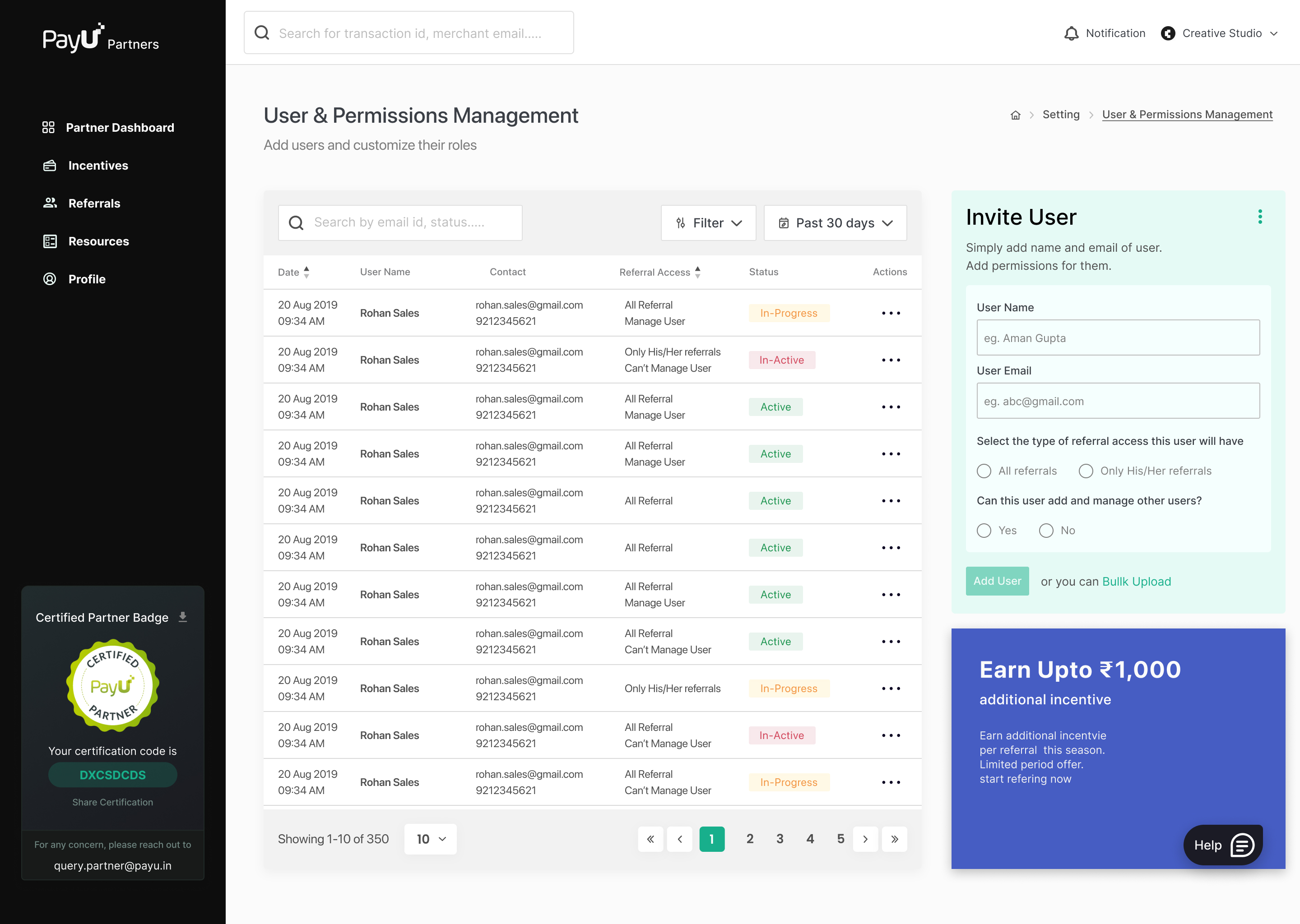
Users & Permission Management

Agency partners often have teams. This screen lets an account owner invite sub-users, assign roles (Admin, Manager, Viewer), and revoke access — all without contacting PayU support. Role-based permissions ensure sensitive incentive data stays protected while enabling collaboration across large partner organisations.
payu-partners.com/settings/users
PAY Drop payu-screen-03.jpg here
PayU Partners — Users & Permission Management
Role-based access
Admin, Manager, and Viewer roles map to real org structures — no over-permissioning or under-permissioning.
Self-serve invites
Partners invite team members directly — no email chains to PayU support, no waiting for provisioning.
Audit visibility
User list shows last active timestamp and current status — giving account owners confidence in who has access.
04
Support

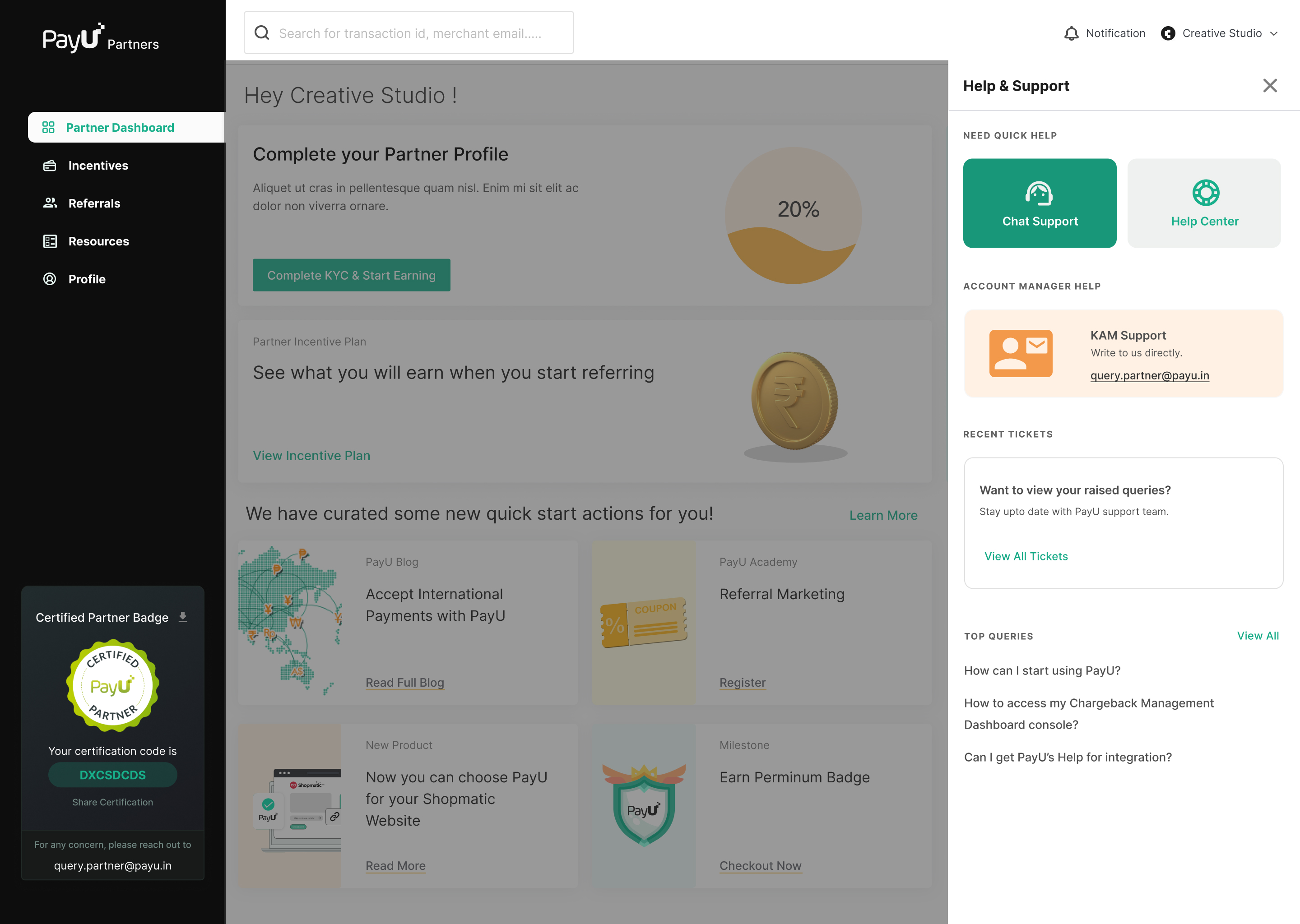
Help & Support

A self-serve help centre reduces inbound support load by surfacing FAQs, onboarding guides, and integration documentation contextually. Partners can raise tickets, check ticket status, and access a dedicated relationship manager contact — all from one place, reducing frustration during critical onboarding moments.
payu-partners.com/help
PAY Drop payu-screen-04.jpg here
PayU Partners — Help & Support
Contextual FAQs
Help content adapts to where the partner is in their journey — onboarding FAQs shown early, integration docs later.
Ticket management
Partners can raise, track, and follow up on support tickets without leaving the platform or switching to email.
RM contact
High-value partners get a dedicated relationship manager — surfaced prominently so escalation is always one click away.
05
Knowledge Centre

Self-Serve Knowledge Centre

A built-in video library that lets partners learn at their own pace — covering everything from merchant onboarding to integration setup and incentive tracking. Instead of waiting on support calls, partners can watch step-by-step video guides, search by topic, and get answers instantly without ever leaving the dashboard.

payu-partners.com/help/knowledge-centre
PAY Drop payu-screen-05.jpg here
PayU Partners — Self-Serve Knowledge Centre
Video tutorials
Step-by-step video guides for every key task — from adding a merchant to tracking incentives — so partners can onboard without any support dependency.
Topic-based search
Partners can search by keyword or browse by category to quickly find the exact guide they need, reducing time spent hunting through documentation.
Always contextual
Relevant help content surfaces based on where the partner is in the dashboard — reducing inbound support tickets at the moments that matter most.

Results & Metrics

40%

Reduction in onboarding drop-off rate

3x

Faster partner onboarding (14 steps → 4 phases)

60%

KAM time reduction via self-serve features

25%

Increase in merchant referrals post-launch

Key Wins

  • Self-serve onboarding: Partners no longer wait for KAM approval at every step. Clear phase-based progression reduces anxiety.
  • Real-time transparency: Settlements & incentives visible instantly. No more surprises or manual spreadsheet tracking.
  • Developer enablement: Integrated credential management eliminates email coordination for API keys. Faster integration.
  • Multi-product support: Dashboard now supports PayU PG, Invoicing, Subscriptions, Payouts referrals — not just PG.
  • Platform partner parity: Enterprise partners now have same self-serve capabilities as individual resellers.

What We Learned & What's Next

What I'd Do Differently

Initial designs assumed single-session onboarding — wrong assumption. Many enterprise partners have multiple decision-makers who need to approve different sections (legal approves agreement, finance approves banking details, tech approves integration). We had to redesign the save-state and handoff flow in iteration 2.

Better stakeholder mapping upfront would have surfaced this earlier. Next time: map all decision-makers before wireframing flows.

Design Decisions

  • Persistent progress indicator across all pages (not just onboarding)
  • Timeline communicated upfront (3 days for KYC, not "TBD")
  • In-app messaging replacing 60% of email notifications
  • Nudge cards for incomplete tasks (not mandatory popups)

Future Roadmap

Phase 2 — Community & Engagement

Partner forum, knowledge base, resource library. Partners can ask questions, share best practices, find leads in their vertical.

Phase 3 — Automation & Analytics

Predictive settlements. ML-based anomaly detection. Partner performance scoring. Personalized product recommendations.

Phase 4 — API & Webhooks

Full REST API for platform partners. Webhooks for real-time settlement & incentive events. SSO integration with partner systems.
Explore More Work
See all projects →
Back to All Work