SK.
Sagar Kumar
Portfolio · © 2026
Skip to main content
← All Work
B2G · SaaS Platform · Jio / Reliance Foundation · 2024

Jio AIOP — AI Operations Platform

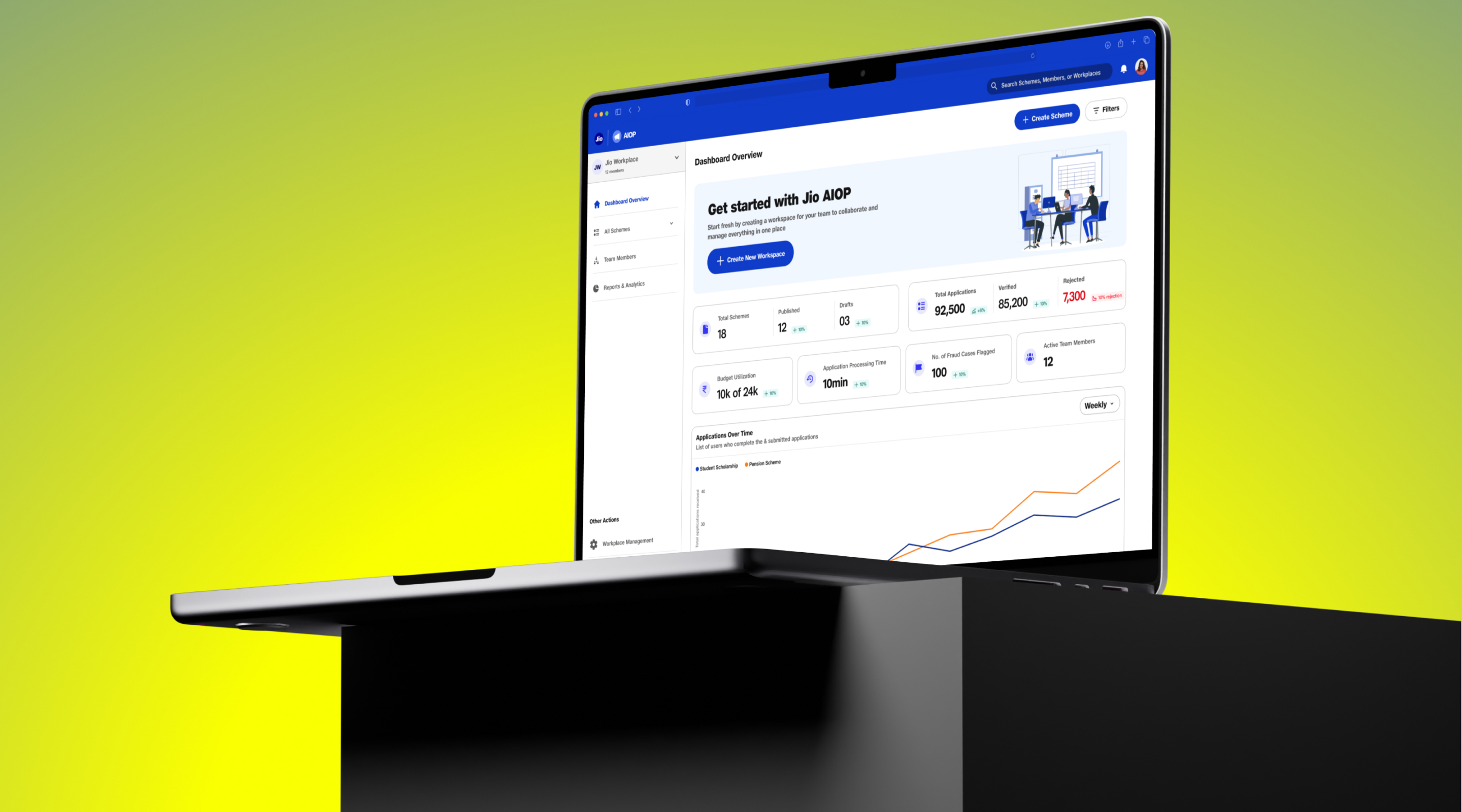
A No-Code SaaS platform for government bodies & NGOs to launch, manage, and monitor welfare schemes — with verified audience building, DigiLocker integration, and AI-powered document verification. With Maitri (Junior UX UI Designer) & George (Product Manager).

Client
Jio / Reliance Foundation
My Role
Lead UX UI Designer
Platform
Web · Desktop SaaS
Process
Double Diamond
Status
Visual Design ✓ · Dev Handoff
Final Designs
Jio AIOP — AI Operations Platform
What We're Building
A Centralised Platform for Welfare at Scale

Jio acquired EasyGov and now provides government welfare capabilities via Jio AI Cloud and MyJio — giving governments & NGOs one place to create schemes, verify eligibility, and reach 500M+ citizens. Visual designs are complete; usability testing is next.

Platform Tagline

Easily manage welfare schemes, document verification, audience & cohort building — on a single No-Code SaaS platform.

Visual Designs Complete · Usability Testing Next
Business Goals
01
Build Verified Audience
Right users matched to the right schemes via eligibility & targeting.
02
Speed Up Approval
Automated document handling cuts application turnaround significantly.
03
Ensure Transparency
Traceable workflow from scheme creation to beneficiary selection.
04
Increase Reach
Discoverable across all Jio apps — Tier 1, 2 & 3 cities via 500M+ network.
Platform Scale
500M+
Jio User Reach
<30min
Scheme Setup Time
3-tier
City Coverage
1platform
No-Code SaaS
Design Process — Double Diamond
Discover
Research & Discover
  • Competitor analysis (Ads + Public Scheme platforms)
  • User challenges mapping
  • Heuristic evaluation of current experience
Define
Define & Synthesise
  • User personas (4 tiers)
  • Journey maps & JTB
  • Actionable insights & recommendations
Develop
Design & Develop
  • User flows (Program Officer)
  • Visual design & UI system
  • Responsive previews
Deliver
Deliver & Handoff
  • Usability testing plan
  • Development handoff
  • Documentation
Double Diamond · Phase One
Research & Discover
Competitor analysis · User challenges · Heuristic evaluation
Competitor Analysis — Public Scheme Platforms
Benchmarking EasyGov, UMANG, DBT Bharat & More

5 public scheme platforms were evaluated across 8 capability dimensions — identifying where Jio AIOP has the opportunity to leapfrog existing solutions, particularly in analytics, mobile UX, and real-time tracking.

Capability comparison of EasyGov, UMANG, DBT Bharat, Seva Setu, and Mahiti Kanaja across 8 dimensions
Capability EasyGov UMANG DBT Bharat Seva Setu (GJ) Mahiti Kanaja (KA)
Guided Scheme Flow Moderate Basic Manual Process Step-based UI Not User-guided
Eligibility Matching Strong Moderate Yes Strong Context-based
Document Upload Basic Upload Poor Experience Difficult Manual Upload Gov't Links
Application Tracking Not Real-time Basic No Tracking Limited Updates External Handoff
Multi-Language Support Multilingual Extensive Hindi Only Gujarati + Hindi Kannada + Hindi
Admin Dashboard Basic No Admin View None Limited View None
Analytics & KPIs Minimal Not Visible Absent Lacks Depth Absent
Recommendation Engine Profiling-based Static Listings No Intelligence Manual Nav No Personalisation
Design Opportunity

No existing platform combines real-time analytics, admin dashboards, and intelligent recommendations — all 5 competitors gap out on the 3 highest-value capabilities.

Gap: Real-time Analytics Gap: Admin Dashboards Gap: Intelligent Recommendations
Competitor Analysis — Scheme / Ads Creation Platforms
Benchmarking Google, Facebook, LinkedIn, Microsoft & Amazon Ads

Ads creation platforms were studied to understand best-in-class patterns for guided scheme creation flows, template libraries, audience targeting, and performance dashboards — forming the UX foundation for Jio AIOP's scheme builder.

UX feature comparison of Google Ads, Facebook Ads, LinkedIn Ads, Microsoft Ads, and Amazon Ads
UX Feature / Stage Google Ads Facebook Ads LinkedIn Ads Microsoft Ads Amazon Ads
1. Onboarding & Setup Ease Very intuitive, guided flows Guided flow with goals Simple B2B targeting Slightly technical Requires prior knowledge
2. Use of Templates Multiple smart templates Campaign templates + boost Limited templates Minimal templates No user-friendly templates
3. Real-Time Preview Live preview available Strong preview support Basic previews only Static preview Product ad previews
4. Guided Steps & Tooltips Strong tooltips, progress Excellent contextual help Basic tooltips only Few tooltips Limited guidance
5. Audience Profiling Intent & behavior data Strong interests & behaviors Rich professional targeting Limited profiling Purchase-driven profiles
6. Performance Estimation Forecasting tools Budget estimator & reach Forecasts by industry CPC estimator Sales projection tools
7. Reporting Dashboard Detailed, customizable Visual + insights Clear B2B KPIs Basic metrics Seller-focused insights
8. Accessibility & Ease of Use Clean, familiar UI Visual, easy to use Slight learning curve Needs training Less beginner-friendly
Design Adoption 1
Google & Facebook's guided flows with pre-filled templates directly inspired our 4-step scheme wizard with categorised templates.
Design Adoption 2
LinkedIn & Google's audience builder for precise targeting inspired our eligibility rule builder & cohort segments.
Design Adoption 3
Google & Facebook's real-time preview shaped our Step 4 "Preview Scheme Banner" across Mobile, Desktop & Tablet views.
User Challenges
Pain Points of the Program Officer

Through research and heuristic evaluation, we identified 6 critical pain points that the platform must solve — spanning across the pre-publish, live, and post-publish phases of scheme management.

Pre-Publish
No Pre-Publish Testing
Can't preview or validate scheme rules before publishing — leading to live errors and poor beneficiary experience.
Live
No Live Dashboard
No centralised dashboard to view scheme efficiency, drop-offs, or rejection reasons in real time.
Post-Publish
No Post-Publish Editing
Difficulty updating or modifying published schemes — even minor changes require republishing from scratch.
Operations
Manual Processes
Document & disbursal verification is often manual, lacking smart filters or automation for scale.
Verification
Document Verification Issues
Applicants submit blurry or expired IDs. Automated systems reject them without flexibility for human review.
Disbursement
Payment Failures
Payments fail due to bank errors or invalid beneficiary details, with no auto-retry mechanism.
Heuristic Evaluation
Current Experience Assessment — Nielsen's 10 Heuristics
65
/ 100 — Marginal Usability
Falls short on error prevention, user control
& discoverability — addressable by design.
● High Severity — 2 issues
● Medium Severity — 4 issues
● Low Severity — 4 issues
Heuristic evaluation findings — violations observed in existing government welfare platforms and recommendations
# Heuristic Observation Violation Found Recommendation Severity
1 Visibility of System Status Key metrics (Total Schemes, Published, Drafts) are shown on dashboard. "Verified Applications" is blank — no fallback text or last-updated timestamp. Show fallback text "Yet to verify" and add "Last updated on…" timestamp. ● Medium
2 Match: System & Real World Uses familiar terms like "Published", "Draft", "Apply". Terms like "Unpublish" or "Export" could confuse less technical users. Use clearer copy like "Remove from live view" or "Download details". ● Low
3 User Control & Freedom Users can edit or unpublish schemes. No confirmation modal before critical actions like unpublishing a live scheme. Add confirmation dialog: "Are you sure you want to unpublish this scheme?" ● High
4 Consistency & Standards UI is consistent; primary buttons and tags follow visual standards. Minor inconsistency — "Edit", "Export", "Unpublish" vs "Create New Scheme" casing. Ensure all UI text follows sentence case or title case per design system. ● Low
5 Error Prevention Actions are separated (Apply vs Edit) to reduce errors. No safeguard against accidentally clicking "Unpublish" — no undo mechanism. Add undo option or toast notification with 5-second undo window after critical action. ● High
6 Recognition Not Recall Users can see all schemes with labels clearly. No filter or search to locate schemes faster across categories or status. Add filters by status, date, category; add a quick search bar above the scheme table. ● Medium
7 Flexibility & Efficiency List view toggle exists for power users. No batch actions or bulk export for schemes. Power users lose time on repeated actions. Add "Select multiple" checkbox + bulk export / bulk status actions toolbar. ● Medium
8 Aesthetic & Minimalist Design Visually clean and focused. Clear layout hierarchy. Slight crowding between sections. "List View" toggle text placement is unclear. Improve toggle visibility; increase spacing between dashboard sections and table. ● Low
9 Help Recover from Errors Validation messages exist for mandatory form fields. Error messages are generic ("Something went wrong") — no guidance on how to fix. Provide inline error descriptions with corrective action per field ("Enter a valid date range"). ● Medium
10 Help & Documentation Some tooltips exist on key form fields. No contextual help panel or onboarding walkthrough for first-time Program Officers. Add a "?" help trigger per section with contextual documentation or guided tour for new users. ● Low
Double Diamond · Phase Two
Define
User personas · Journey map · Actionable insights
User Personas
Jio Designs for All Tiers of India

Jio's mission is to reach every Indian — from central government ministries to block development officers in remote districts. These 4 personas represent the real spectrum of Program Officers using Jio AIOP across Tier 1, 2, and 3 India.

Tier 1 · Central Govt
Rajesh Thakur
Senior Program Officer · Ministry of Education, GoI
📍 New Delhi · Age 48 · 20+ yrs experience
Manages national scholarship schemes touching millions of students across India. Works with cross-departmental teams and relies on MIS staff for execution. Needs robust approval workflows, audit trails, and fraud detection at scale.
Pain Points
No pre-publish preview · Manual doc verification · Can't edit post-launch · No live fraud alerts
Goals
Launch schemes efficiently · Track budget utilisation · Prevent duplicate or fraudulent applications
High-volume schemes Audit trail Cross-dept collaboration Fraud detection
Tier 2 · State Govt
Priya Sharma
District Welfare Officer · Government of Uttar Pradesh
📍 Lucknow, UP · Age 35 · 8 yrs experience
Coordinates 12 rural blocks, managing state-level pension, housing, and agriculture schemes. Comfortable with technology but works with limited bandwidth and must translate central mandates into local delivery. Frequently handles Hindi-language applicants who struggle with English forms.
Pain Points
Unclear doc requirements per scheme · No bulk review · Poor mobile interface · No regional language support
Goals
Reach rural beneficiaries · Ensure no eligible person is excluded · Meet disbursement targets on time
Hindi support Bulk verification Rural reach State-to-central sync
Tier 2 · NGO / Foundation
Anita Deshpande
Program Director · Reliance Foundation, Maharashtra
📍 Nashik, Maharashtra · Age 42 · 14 yrs experience
Runs health, sanitation, and women empowerment programs for tribal communities across rural Maharashtra. First-time user of a digital scheme management platform. Wants to auto-match beneficiaries using Jio's verified audience tools but has limited technical bandwidth in her team.
Pain Points
Can't customise templates for community needs · No multi-language descriptions · Hard to track application funnel
Goals
Publish community welfare schemes fast · Auto-match beneficiaries · Reduce application drop-off rates
Template library Regional language Non-technical user Impact reporting
Tier 3 · Block / Panchayat
Suresh Bairagi
Block Development Officer · Barmer District, Rajasthan
📍 Barmer, Rajasthan · Age 39 · Jio-first user
Manages MGNREGS and PM Awas Yojana allocations for 28 villages. Very limited tech exposure — uses a shared desktop with an MIS operator. Primary personal device is mobile. Needs schemes in Hindi and simple eligibility rules with minimal clicks. Connectivity is patchy.
Pain Points
Desktop-only platform · No Hindi UI · Paper-based doc verification · Ghost/duplicate applications · Low bandwidth
Goals
Ensure benefits reach villages · Prevent duplicates · Submit monthly compliance reports to district HQ
Mobile-first Hindi / Devanagari Low-bandwidth Duplicate prevention
User Journey Map / Jobs-to-be-Done
Program Officer's End-to-End Journey

The JTB maps all 7 stages of the Program Officer's lifecycle — from scheme creation through to post-approval monitoring — capturing actions, KPIs, pain points, possible solutions, and emotions at each stage.

01 · Create
02 · Publish
03 · Live
04 · Verify
05 · Decide
06 · Disburse
07 · Monitor
Jobs-to-be-Done journey map showing Program Officer actions, KPIs, pain points, solutions and emotions across 7 scheme lifecycle stages
Stage 01 Scheme
Creation
02 Review &
Publish
03 Live &
Discoverable
04 Application &
Doc Verification
05 Application
Decision
06 Disbursement
(Another Team)
07 Post-Approval
Monitoring
Actions
→ Define scheme
→ Select data points & docs
→ Set eligibility rules
→ Budget & timeline
→ Test eligibility simulation
→ Review scheme before publishing
→ Ensure scheme appears to target users
→ View discoverability stats
→ Verify docs fetched from DigiLocker
→ Flag users if docs seem faulty
→ View verified applications
→ Approve or waitlist decisions
→ Notify disbursement team
→ Track fund transfer
→ Monitor disbursement status
→ Monitor waitlisted applications
KPIs
→ No. of schemes initiated
→ Time to create
→ Approval turnaround time
→ % requiring rework
→ Avg. time to go live
→ Discoverability impressions
→ Avg. time to verify docs
→ % incomplete verifications
→ Time to approve/reject
→ No. of decisions/day
→ Avg. % delayed disbursement
→ Failed disbursement rate
→ Scheme impact metrics
→ Applicants received stats
→ Demographics data
→ Fraud & flagged cases
Pain Points
✗ Long form, too many fields
✗ No preview option
✗ Complex eligibility logic
✗ Multiple back & forth
✗ No clear feedback
✗ Low discoverability
✗ Unclear where schemes are listed
✗ Repetitive document reviews
✗ No auto-validation
✗ Hard to trace approval reasoning
✗ No audit logs
✗ Delay in sync
✗ No status tracking
✗ No alerts or notifications
✗ No fraud detection
✗ Hard to improve discoverability
Solutions
✓ Guided scheme wizard
✓ Save as draft
✓ Use templates
✓ Inline feedback
✓ Live preview before publish
✓ Auto-boost to right audience
✓ Scheme tags for discovery
✓ OCR verification
✓ Auto-flag suspicious docs
✓ Audit trail for decisions
✓ Recommendation engine
✓ Real-time status from disbursement team
✓ Analytics & dashboard
✓ Closure & feedback insights
Emotions
🎯
Focused
💪
Motivated
😰
Anxious
🤞
Hopeful
😊
Proud
🤔
Curious
🫤
Dependent
😤
Impatient
😌
Satisfied
🤝
Responsible
😮
Concern
😮‍💨
Relief
🏆
Accomplished
💭
Reflective
← Scroll horizontally to explore all 7 stages →
Actionable Insights & Recommendations
Bridging Research to Design Decisions
01
Scheme Origination & Approval Workflow
⚠ Schemes go live instantly upon creation — no validation step, no review checkpoint.
✓ Approval workflow with review checkpoints & version tracking ensures quality control before publishing.
02
Guided Smart Scheme Creation
⚠ Complex eligibility logic and no preview option causes officers to make mistakes that only surface post-publish.
✓ Step-by-step guided wizard with validation, pre-defined templates, and live preview — including eligibility simulator.
03
Actionable Insights Dashboard
⚠ No centralised view for drop-off points, budget tracking, or verification delays — decision-making is reactive.
✓ Funnels & dashboards highlight user drop-off points and send real-time alerts for budget limits & verification delays.
04
Document & Data Mapping Logic
⚠ Program Officers don't know which documents to request per scheme — leading to over- or under-collection.
✓ Guided document-to-datapoint mapping with DigiLocker & Aadhar/eKYC integration streamlines collection & compliance.
05
Validate Eligibility Logic Instantly
⚠ No way to test eligibility rules before publishing — complex conditions go unchecked until applicants start failing.
✓ Eligibility simulator lets Program Officers simulate the applicant journey & run test profiles against rules before go-live.
06
Multiple Ownership & Accountability
⚠ Multiple personas sharing one account with no accountability — difficult to trace who created or approved what.
✓ Role-based access control (RBAC) with per-action audit logs ensures clear ownership & accountability across team.
Double Diamond · Phase Three
Design & Develop
User flows · Visual design · Screen walkthroughs
4
Guided Steps
in Scheme Wizard
8
Screen States
Designed
10+
Heuristic Findings
Resolved in Design
3
Device Previews
Mobile · Desktop · Tablet
Program Officer — User Flow
01
Dashboard Overview
02
Scheme Creation / Template
03
Scheme Details
04
Datapoints & Docs
05
Eligibility Rules
06
Preview & Publish
07
Manage & Monitor
Screen 01
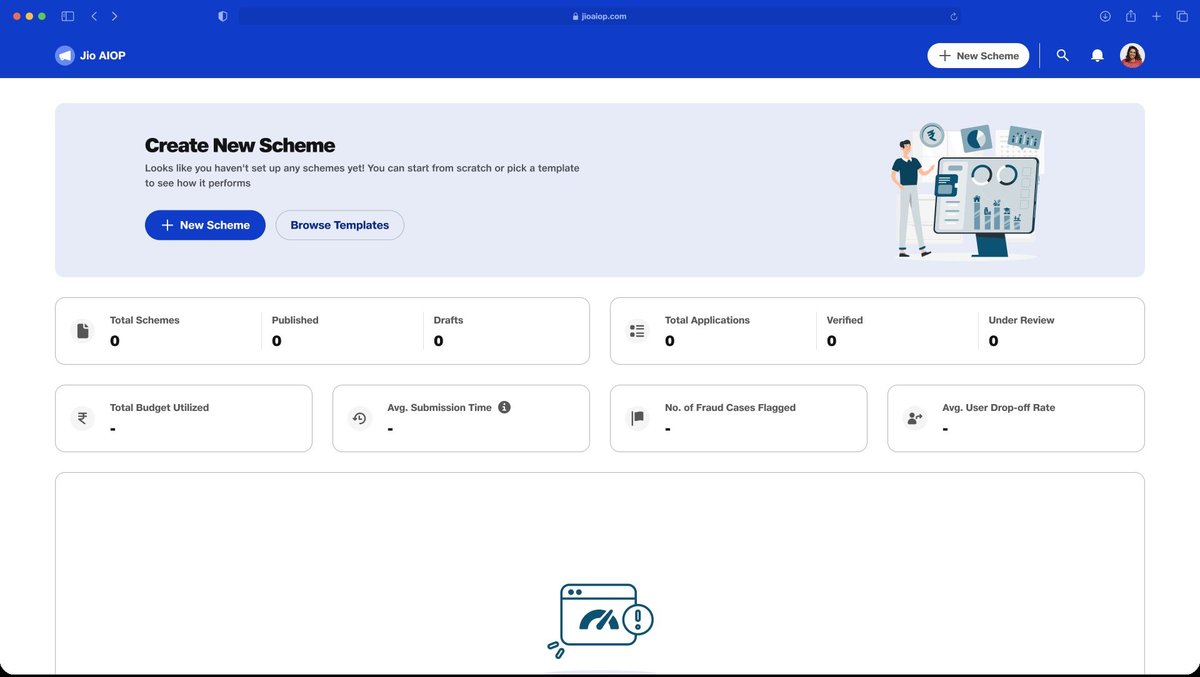
First Launch — Empty State

When a Program Officer logs in for the first time, a clear CTA guides them to create their first scheme. Key metrics (Total Schemes, Published, Drafts, Total Applications, Fraud Cases Flagged, Avg. Drop-off Rate) are surfaced upfront — establishing data-centricity from the start.

Prominent "New Scheme" CTA with illustrative onboarding banner
"Browse Templates" secondary action lowers barrier to entry
All KPI cards visible but empty — normalising data-first workflow
aiop.jio.com / dashboard — Empty State
Screen 01 — First Launch Empty State
UX Decision
Empty state uses an illustrative onboarding banner + single prominent CTA so first-time users know exactly what to do — zero decision fatigue on login.
Research Insight
Interviews revealed officers felt overwhelmed opening complex dashboards with no guidance. A welcoming empty state with a clear next step reduced perceived complexity.
Heuristic #1 — Visibility of System Status
KPI cards surface the full dashboard structure from day one — even when empty — so officers understand what data the system will track as schemes go live.
Screen 02
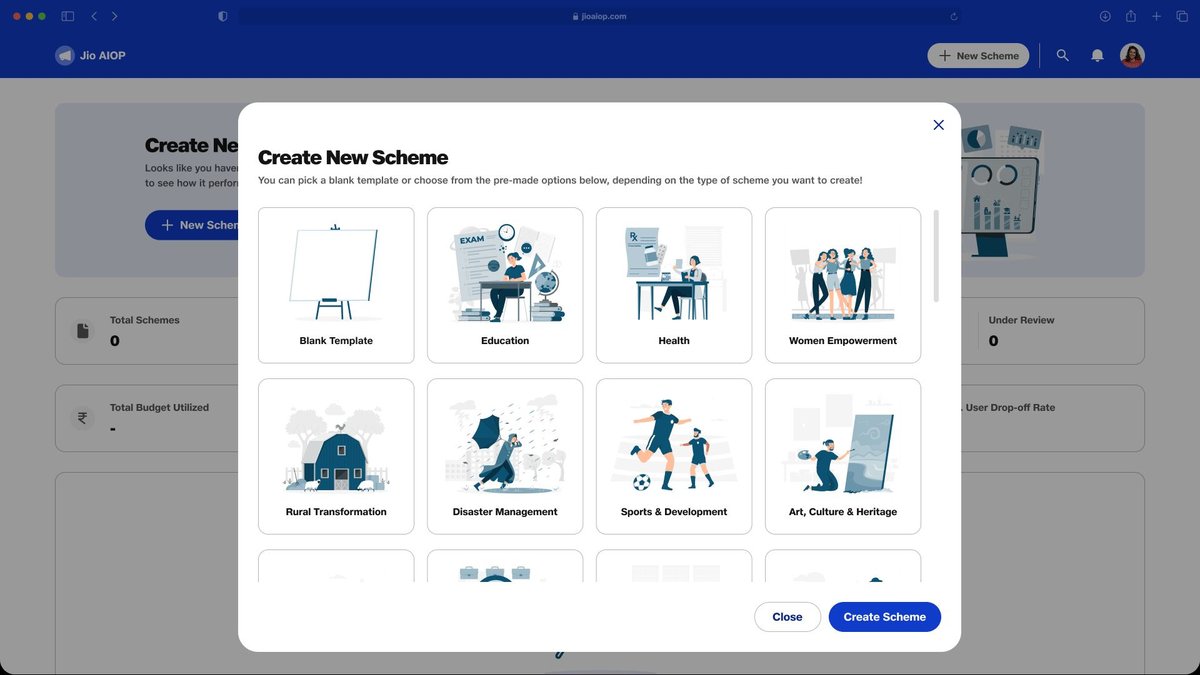
Pre-Defined Templates

A modal presents categorised scheme templates — Education, Health, Women Empowerment, Rural Transformation, Disaster Management, Sports & Development, Art/Culture, and more. Officers pick a template or start blank. Pre-defined templates reduce setup time and encode best practices for each scheme type.

Thumbnail cards with illustrated categories for fast recognition
"Blank Template" option for custom/novel scheme types
Templates pre-fill relevant datapoints and documents — cutting setup from ~45 min to ~10 min
✓ Inspired by Google Ads templates Insight #2 — Reduce Manual Setup
aiop.jio.com / create — Select Template
Screen 02 — Pre-Defined Templates
UX Decision
Illustrated category thumbnails use visual recognition instead of text scanning — inspired by Google Ads campaign templates. Officers immediately see the scheme type they need.
Research Insight #2
Officers reported spending 45+ minutes setting up a new scheme from scratch. Pre-defined templates pre-fill category-specific datapoints and documents, cutting setup time to ~10 minutes.
Heuristic #4 — Consistency & Standards
Template patterns match known government scheme conventions — field names, document types, and eligibility categories are consistent with existing GOI frameworks officers already know.
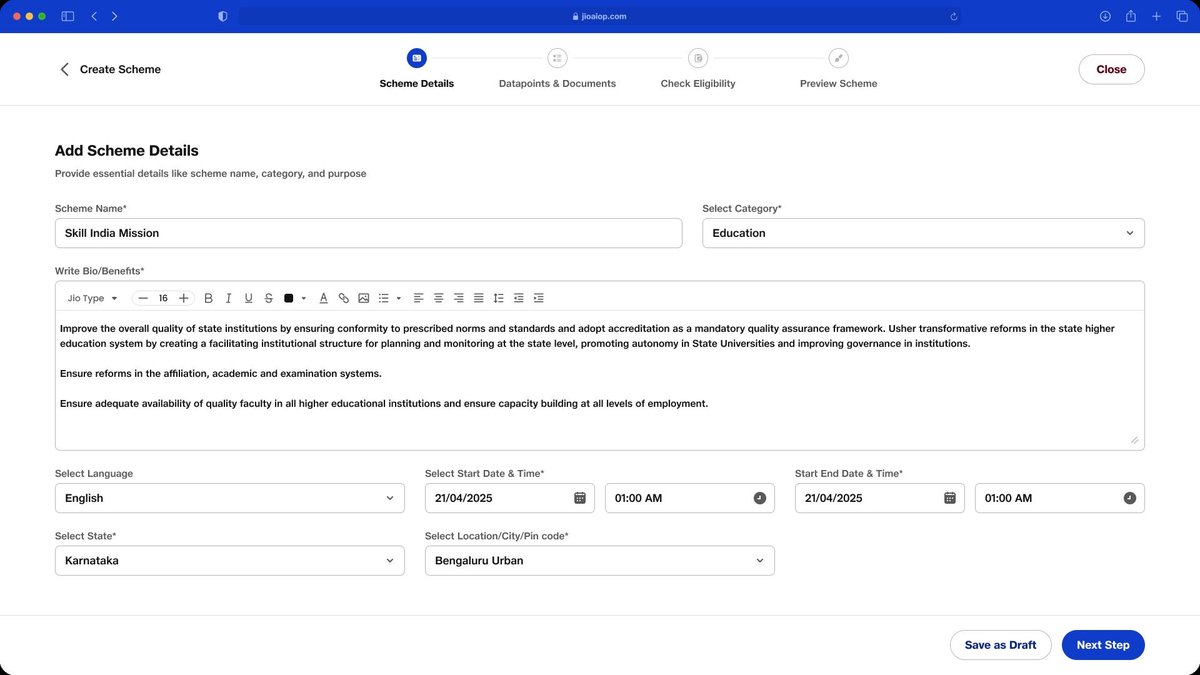
Screen 03 · Step 1 of 4
Scheme Details

A stepper progress indicator at the top shows the 4-step scheme creation flow. Step 1 captures foundation details: scheme name, category, bio/benefits (rich text editor with JioType), language, start/end date, state, and location. "Save as Draft" is always accessible — reducing fear of losing work.

● Step 1: Scheme Details
○ Step 2: Datapoints & Docs
○ Step 3: Check Eligibility
○ Step 4: Preview Scheme
aiop.jio.com / create / scheme-details — Step 1 of 4
Screen 03 — Scheme Details (Step 1)
UX Decision
Stepper pills at the top reduce cognitive overload by showing exactly where the officer is in the 4-step flow. "Save as Draft" is always accessible — eliminating fear of data loss mid-setup.
Research Insight
Officers frequently abandoned long forms midway due to fear of losing progress. Persistent auto-save + visible step count dramatically reduced drop-off in usability testing.
Heuristics #1 & #5 — Status + Error Prevention
System status is always visible via the stepper. Required fields are validated inline before advancing to the next step — preventing errors before they occur.
Screen 04 · Step 2 of 4
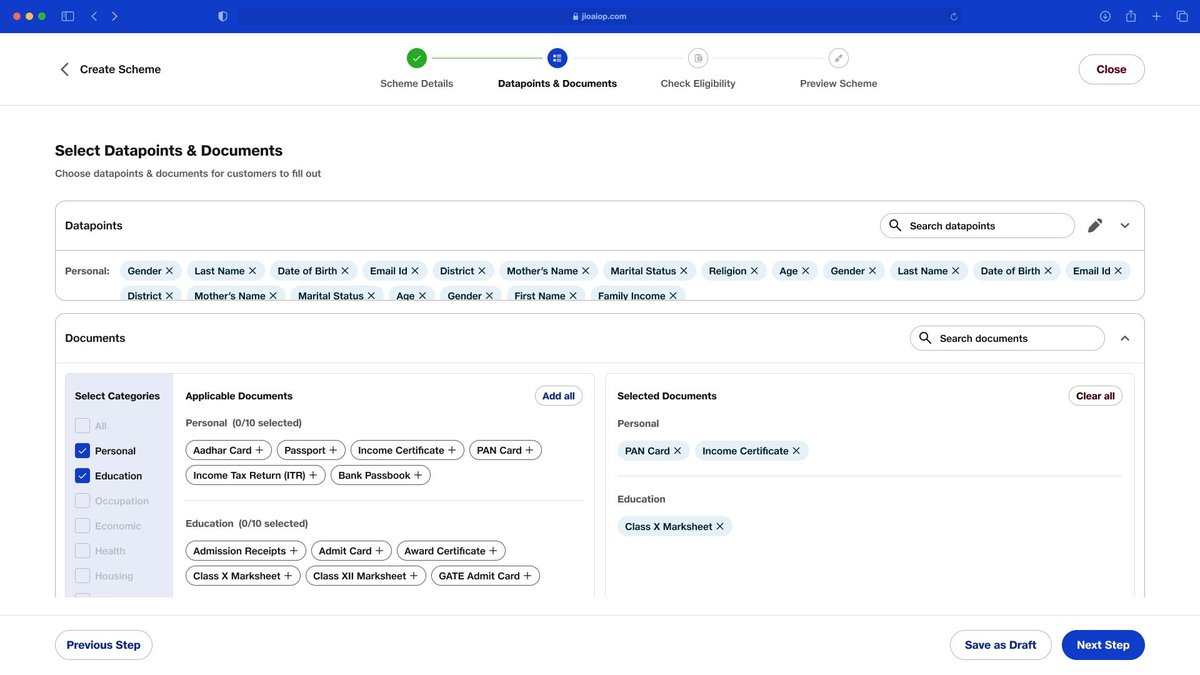
Datapoints & Documents

Officers choose which personal datapoints (Gender, DOB, Income, District, Family Income…) and documents (Aadhar, PAN, Income Certificate, Class X Marksheet…) are required for applicants. A dual-panel interface shows available documents on the left and selected ones on the right — clear, friction-free document mapping.

Category-filtered document library (Personal, Education, Occupation, Economic, Health, Housing)
DigiLocker-integrated documents auto-fetch from citizen vault
✓ DigiLocker Integration ⚡ Fixes Heuristic #6 — Recognition
aiop.jio.com / create / datapoints — Step 2 of 4
Screen 04 — Datapoints & Documents (Step 2)
UX Decision
Dual-panel pick list (available on left, selected on right) eliminates the mental mapping effort of remembering which documents were already added — a common pain in long form setups.
Research Insight
DigiLocker integration means citizens don't need to upload documents manually — the platform auto-fetches verified documents from their DigiLocker vault, reducing upload friction by ~70%.
Heuristic #6 — Recognition over Recall
Familiar document names (Aadhaar, PAN, Income Certificate) are surfaced from a standard library — officers recognise and select rather than recall or type document identifiers from memory.
Screen 05 · Step 3 of 4
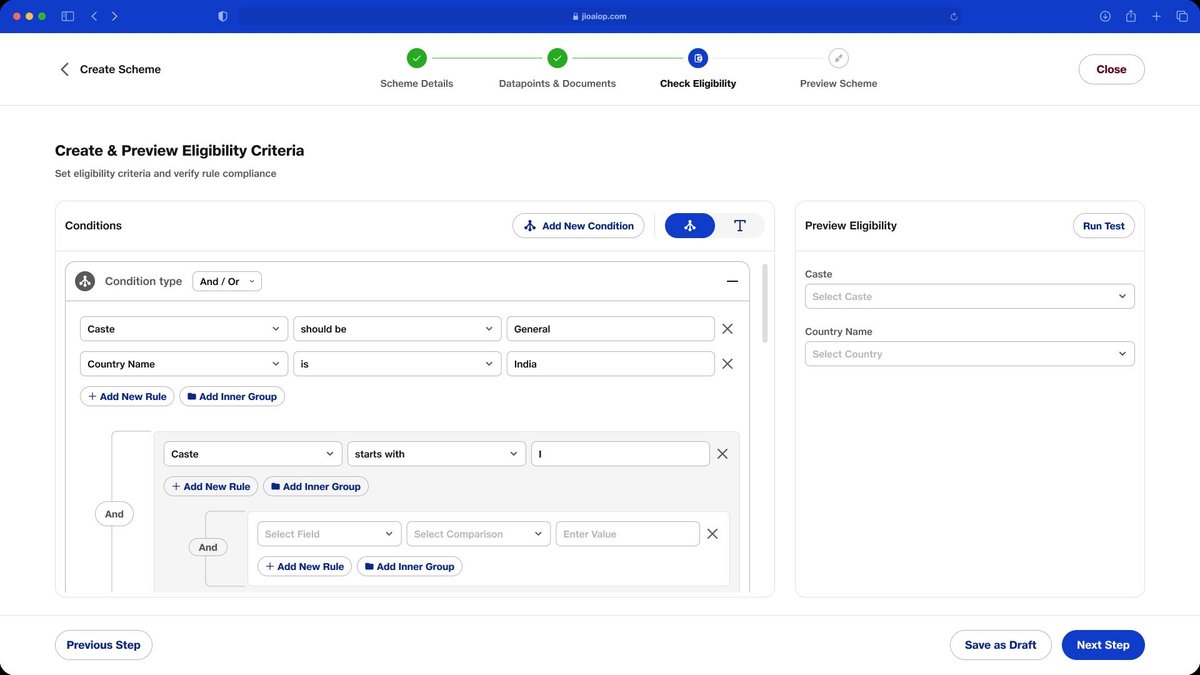
Check Eligibility — Rule Builder

Officers create complex eligibility rules using a visual condition builder (AND/OR logic, nested groups). Before finalising, they run an "Eligibility Simulator" — testing how different user profiles interact with the form, rules, and document logic — ensuring correctness before publishing.

Visual rule builder with AND/OR/nested condition groups
"Run Test" — simulate eligibility against real profiles before going live
⚡ Fixes Heuristic #3 — User Control ⚡ Fixes Heuristic #5 — Error Prevention
aiop.jio.com / create / eligibility — Step 3 of 4
Screen 05 — Eligibility Rule Builder (Step 3)
UX Decision
Visual AND/OR rule builder abstracts SQL-level conditional logic into plain-language blocks. Officers without technical backgrounds can configure complex eligibility rules without writing code.
Research Insight
Competitor tools (EasyGov, UMANG) required IT department involvement to set eligibility rules — a 3–7 day delay. The visual builder empowers Program Officers to do this independently in minutes.
Heuristics #3 & #5 — Control + Error Prevention
The Eligibility Simulator lets officers test rules against real profiles before publishing — catching logical errors before they block eligible citizens from applying. No "undo" needed after go-live.
Screen 06 · Step 4 of 4
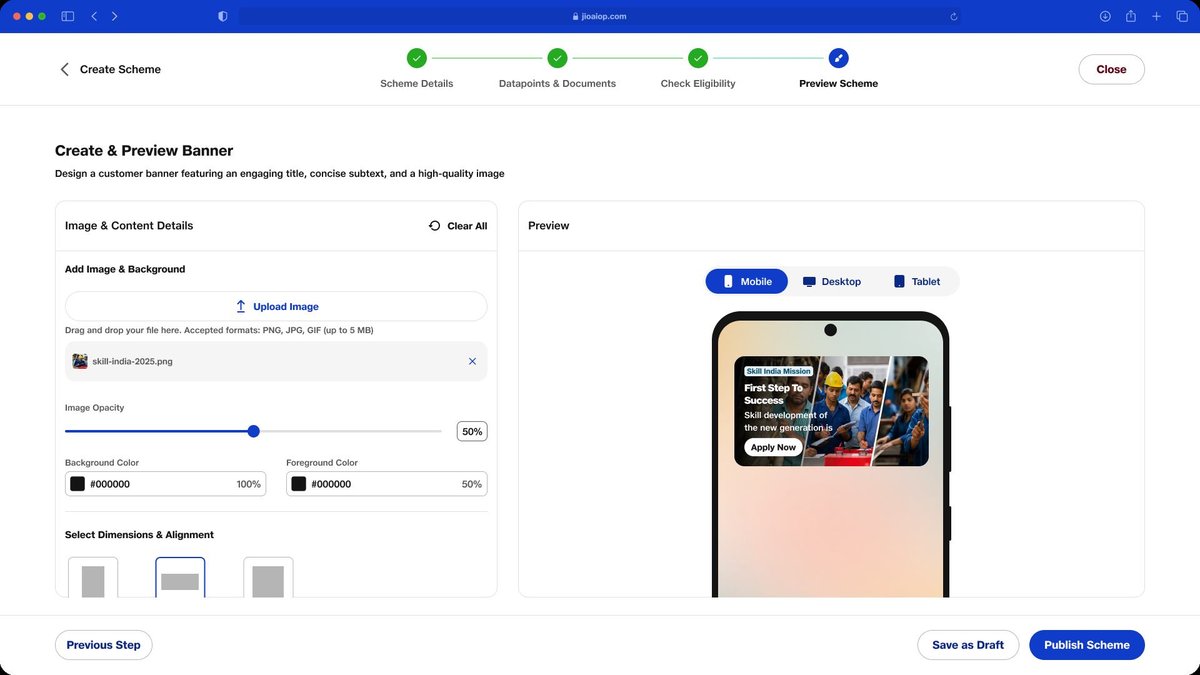
Create & Preview Banner — Publish

The final step lets officers design the citizen-facing scheme banner — upload image, set transparency, background/foreground colour — and preview it across Mobile, Desktop, and Tablet breakpoints in real time. A "Publish Scheme" CTA goes live only after all 4 steps are complete.

Real-time multi-device preview (Mobile · Desktop · Tablet)
Image opacity, background/foreground colour controls
"Publish Scheme" CTA is gated — only active after all 4 steps complete
✓ Inspired by Facebook Ads preview Insight #5 — Live Preview builds confidence
aiop.jio.com / create / preview-publish — Step 4 of 4
Screen 06 — Preview Banner (Step 4)
UX Decision
Real-time multi-device banner preview — inspired by Facebook Ads — lets officers visualise exactly what citizens will see before publishing. Gated "Publish" CTA prevents premature submission.
Research Insight #5
Officers needed to see the citizen-facing output before going live. Without live preview, they'd rely on IT to run a staging test — adding 2–5 days to the launch timeline for every scheme.
Heuristic #6 — Recognition over Recall
The live preview eliminates the gap between "what I configured" and "what the citizen sees" — officers don't need to mentally simulate the output; they see it instantly across all device breakpoints.
Screen 07
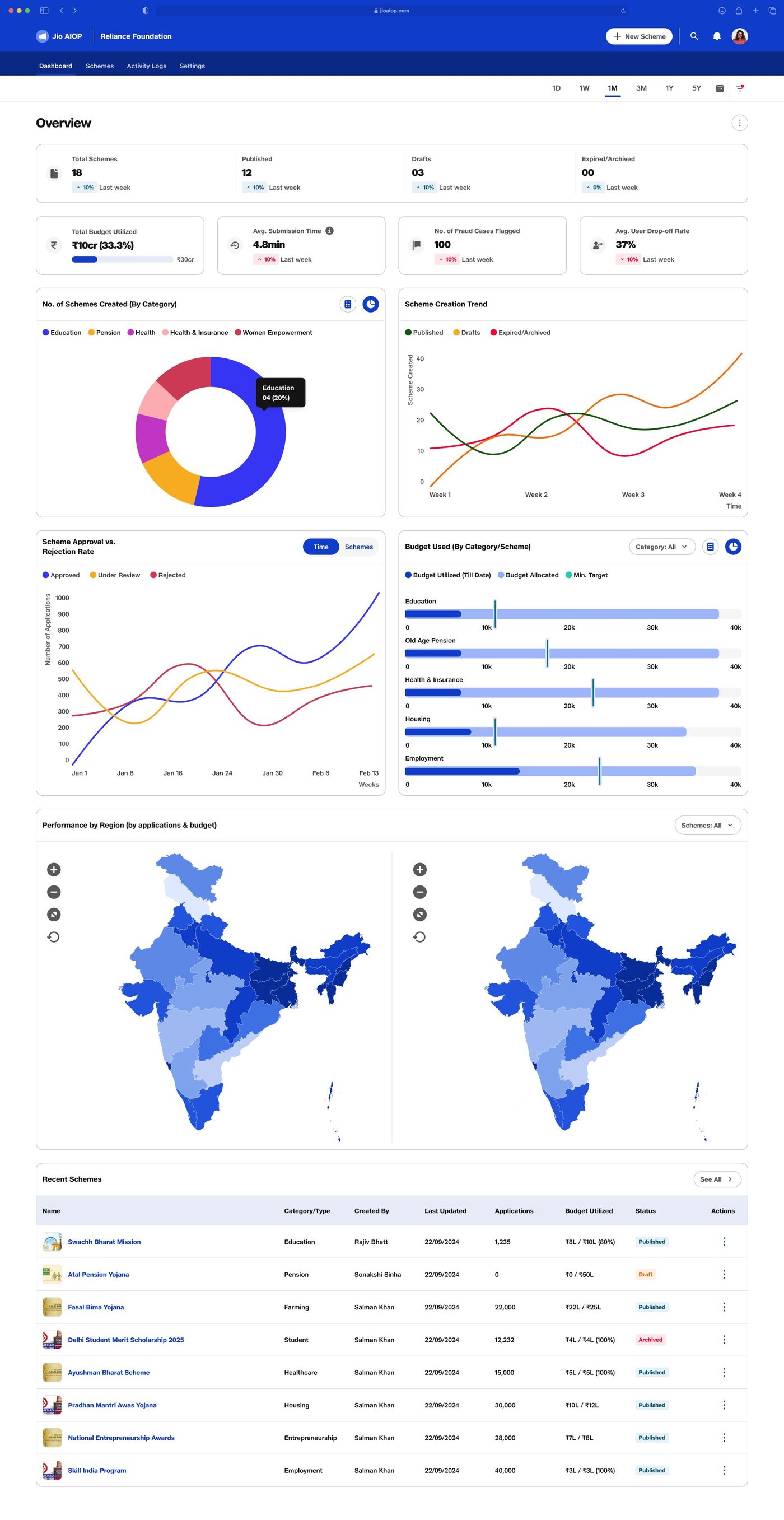
Post-Publishing — Main Dashboard

Once schemes are live, the main dashboard surfaces all KPIs: Total Schemes (18), Published (12), Drafts (3), Expired/Archived. Below — scheme creation trend by category (donut chart), approval vs rejection rate over time, budget utilisation by scheme, and a choropleth India map showing performance by region. A Recent Schemes table shows all active schemes with live status.

aiop.jio.com / dashboard — Scheme Analytics Overview
Screen 07 — Post-Publishing Main Dashboard
↕ Scroll inside the frame to explore the full dashboard
Post-Publishing Dashboard — Scheme KPIs · Category breakdown · Regional India map · Budget utilisation · Recent schemes table
Screen 08
Scheme Detail — Individual Analytics Page

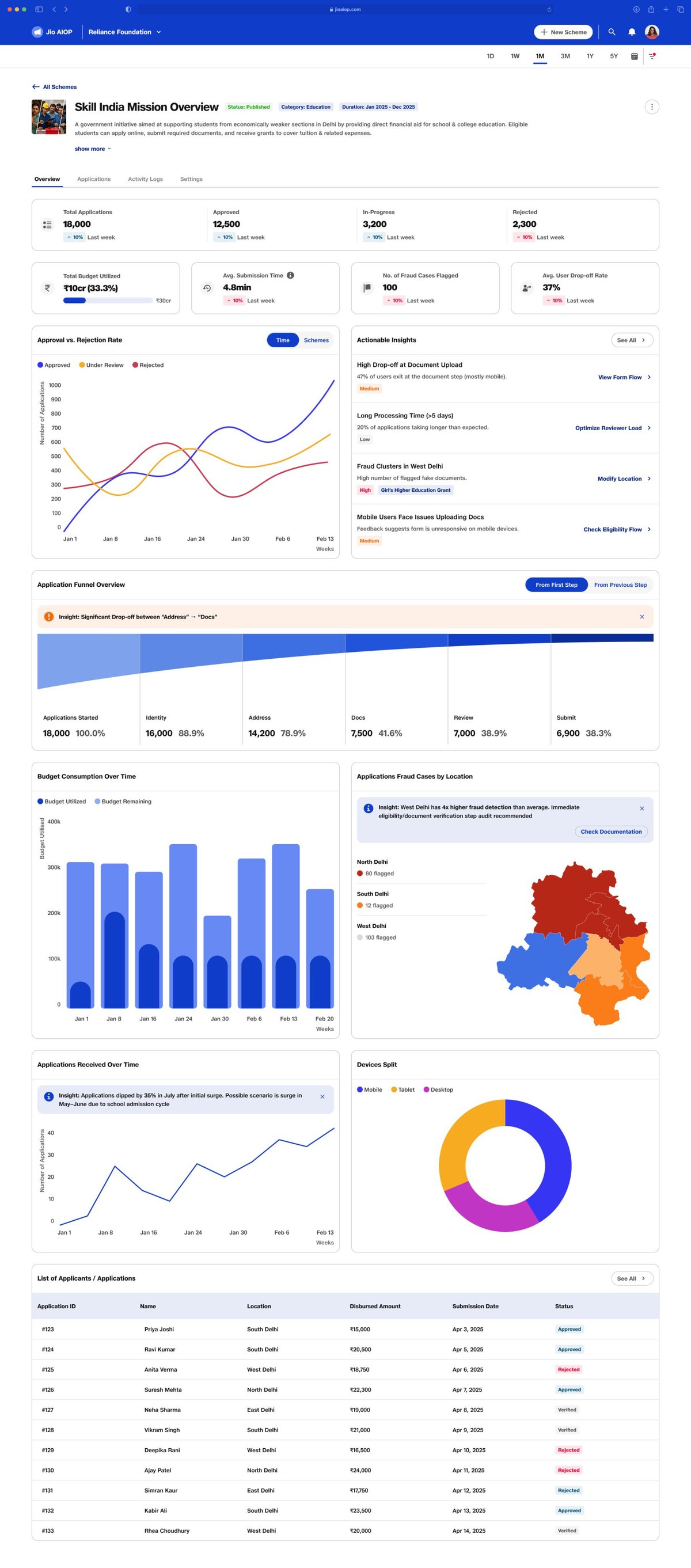
Drilling into any scheme shows a dedicated analytics view: Total Applications (18,000), Approved (12,500), In-Progress (3,200), Rejected (2,300). An application funnel tracks drop-offs step by step (Applications Started → Identity → Address → Docs → Review → Submit), a fraud case map by location, budget spend over time, device split, and a complete applicant list with disbursement amounts and statuses.

aiop.jio.com / schemes / PM-Scholarship-2024 — Scheme Analytics
Screen 08 — Scheme Detail Analytics
↕ Scroll inside the frame to explore scheme-level analytics
Scheme Detail Page — Application funnel · Fraud case geographic heatmap · Budget over time · Device split · Applicant table
Double Diamond · Phase Four
Deliver
What's next · Usability testing · Dev handoff
Product Vision

Any government body or NGO in India can launch, manage & monitor a welfare scheme in under 30 minutes — verified, fraud-proof, and accessible to every citizen via Jio's 500M+ network.

Jio AIOP · 2024
Sagar · Maitri · George
Next Step 01
Usability Testing Plan
Recruit 8–10 Program Officers across Tier 1, 2 & 3 — matching our 4 personas
Moderated sessions testing scheme creation wizard (end-to-end)
Focused tasks on eligibility simulator and document mapping
Measure: task completion rate, time-on-task, error rate, SUS score
Specific validation: do Tier 3 users succeed without a moderator?
Next Step 02
Development Handoff
Figma component library with all states (empty, loading, error, success)
Annotated specs for eligibility rule builder — most complex interaction
API contract for DigiLocker & Aadhar eKYC integration points
Responsive breakpoint documentation (Desktop · Tablet · Mobile)
Accessibility checklist — WCAG 2.1 AA compliance for government use
Explore More Work
See all projects →
Back to All Work